Agents and candidates
An agent in Provantix is a persistent identity that acts: a coding assistant, a support bot, a scheduled job that calls models. Agents are not registered by hand in a directory — they emerge from the telemetry, and you confirm them. That design is deliberate: an agent you forgot to register still shows up; an agent that never acts does not clutter your inventory.
In the product
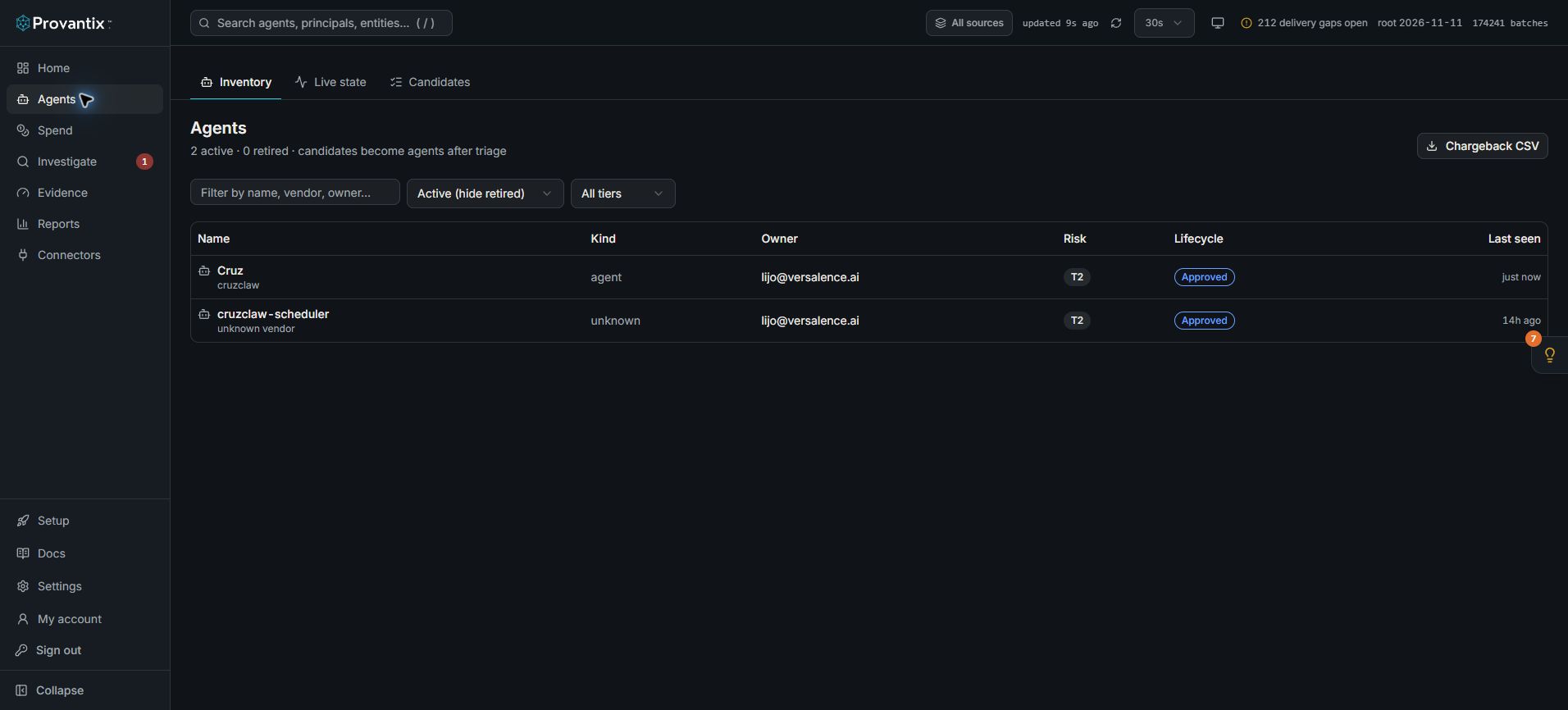
Product capture, 15–16 November 2026. Open the image for full size. Counts and dates are examples from the captured workspace.
Use Inventory to find an agent, Live state to inspect recent activity, and Candidates to review identities not yet mapped. Open the agent name for its detail tabs.
The Agents page
Each row is one confirmed agent, with the columns the table actually shows:
- Name — display name plus the vendor's own id underneath, so the same agent is recognised across renames.
- Kind — agent, or another principal kind when discovery surfaces one.
- Owner — the human accountable for it. An agent with no owner is a finding waiting to happen; the owner field is how accountability survives staff changes.
- Risk tier — the classification you set (for example T2), used to decide how closely the agent is watched.
- Lifecycle — proposed, approved, paused or retired. Lifecycle is a decision, and like every decision it lands in the decision log with your name on it.
- Last seen — when the agent last emitted, so dormant and silent agents stand out.
The Chargeback CSV button downloads the period's cost per owner — the same numbers the billing view shows, ready to paste into a finance spreadsheet.
Click an agent's name for its detail page. Its header shows the owner, tier, lifecycle, recorded cost and expected interval, with actions for maintaining the identity. The detail tabs are:
- Activity — recent records and a link to Investigate.
- Reach — the systems associated with the agent; observed access is not the same as permission.
- Identity — the evidence connecting principals and sessions to the agent.
- Autonomy — an assessment for the owner's review, with its evidence limits.
- Quality — results supplied by your evaluator, not a score certified by Provantix.
- Expected steps — tools that ended runs are expected to include.
- Tools — declared tools and observed tools-and-models analysis.
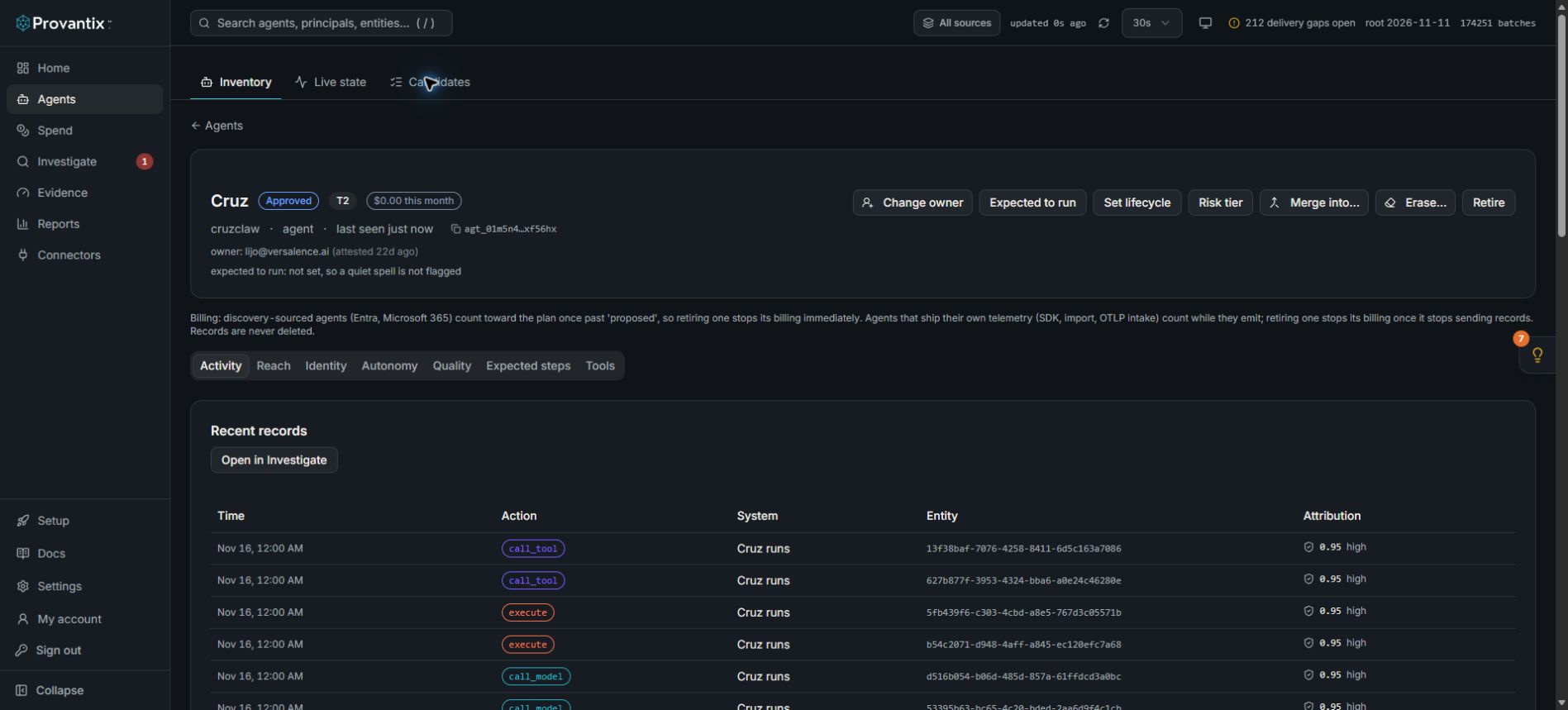
Agent detail captured 15–16 November 2026. An approved lifecycle does not mean every action had human approval.
The billing note on the page distinguishes discovery-sourced agents from agents that emit telemetry. Retiring a discovery-sourced agent stops its billing immediately; a telemetry-sourced agent stops counting once it stops sending records. Records are not deleted.
How an agent becomes real: candidates
When telemetry arrives from an identity Provantix has not seen — a new principal in a token, a new workload identity at a boundary system — the platform does not silently file it under a guess. It creates a candidate: a proposal with the evidence for its identity, the actions it took, and a confidence score.
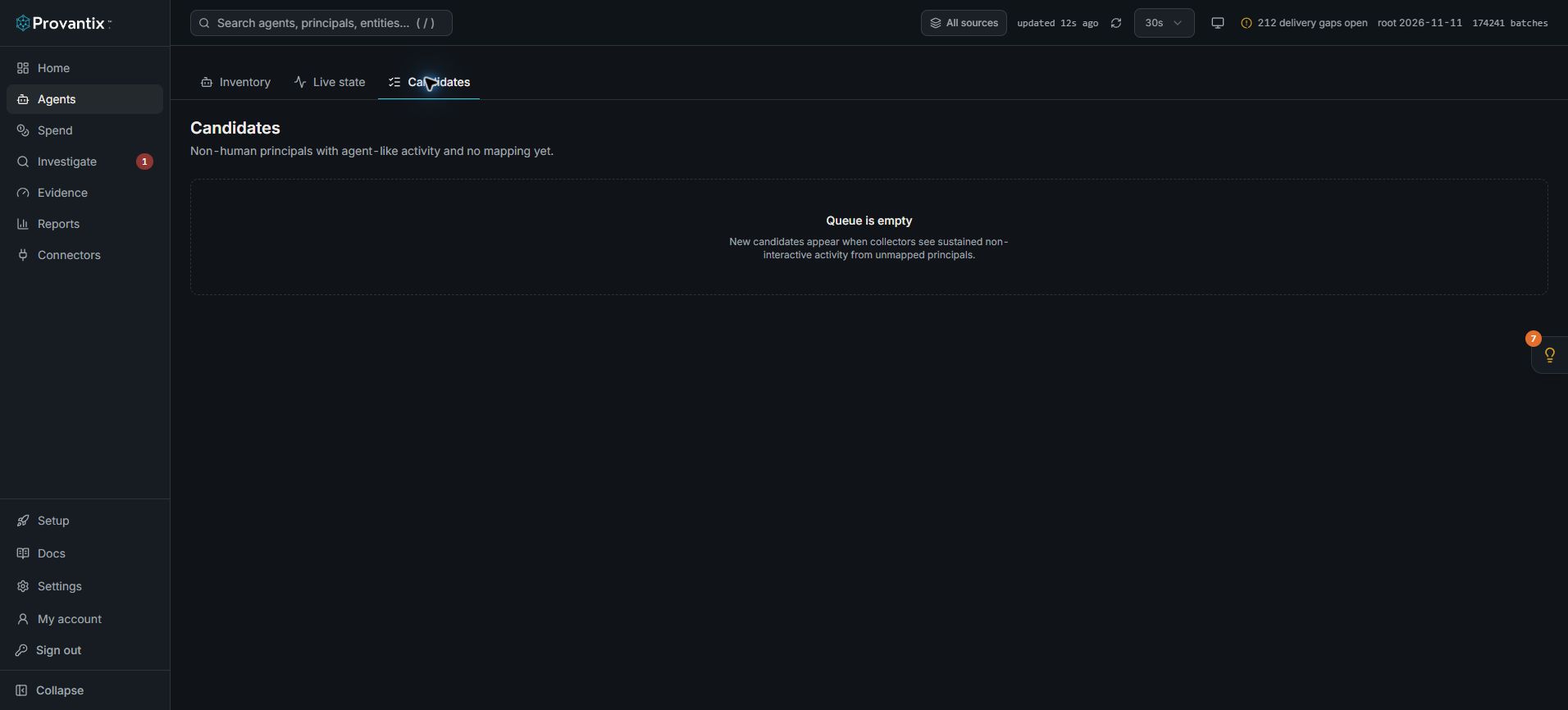
The captured queue is empty. Candidate review actions appear when an unmapped identity is available; this is not proof that no undiscovered agents exist.
When a candidate is available to review, its actions are decisions:
- Confirm — this is a real agent. It gets a registered identity, its history attaches to it, and an owner can be assigned. Confirming is how the agent inventory stays trustworthy.
- Merge — the telemetry belongs to an agent you already registered (a renamed process, a re-deployed container with a new principal id). Merging keeps history continuous instead of splitting one agent into two.
- Dismiss — not an agent worth tracking (a one-off script, a pen-test identity). You give a reason; the dismissal is itself recorded and reversible by an administrator.
A candidate left untouched does not block anything — its records stay searchable — but it keeps the badge on the nav, and an inventory full of unreviewed candidates is how "we have 40 agents" becomes "we actually have 200".
Attribution, in one paragraph
Every record carries an owner claim. Declared attribution means the SDK was told who owns the agent (highest confidence). Token attribution means the identity was read from the credential the agent presented. Inferred means the platform matched behavior — lowest confidence, and the honest thing to do with inferred ownership is review it as a candidate. The method and confidence sit on every record, so when an auditor asks "how do you know this agent belongs to Lijo?", the answer is a field, not a policy PDF.
What to conclude here
The Agents page is your answer to "what AI is running in my organization, and who is responsible for each one?" A healthy organization has every active agent confirmed, owned, and free of open high-severity findings. Anything else is a queue, not a crisis — work it from Candidates, then Findings.