Connectors and telemetry sources
Everything Provantix knows comes from connectors — the paths by which evidence enters your organization's database. The Connectors page (three tabs: Sources, Destination systems and Enforcement tools) is the health board for those paths: what is connected, when it last delivered, and whether anything it sent was rejected.
In the product
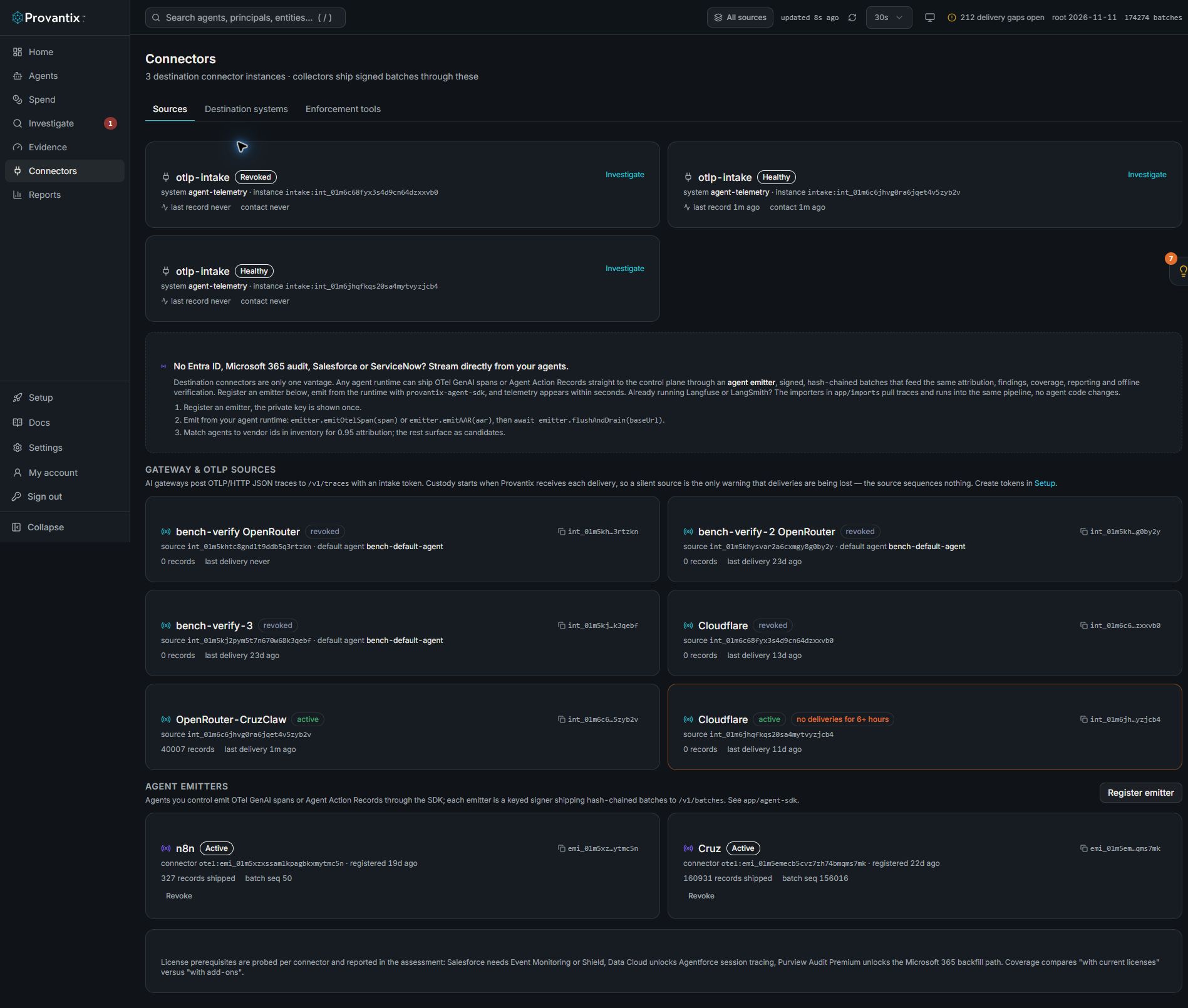
Product capture, 15–16 November 2026. Open the image for full size. Counts and dates are examples from the captured workspace.
Use Sources for telemetry delivery, Destination systems for independent checks, and Enforcement tools for declared control coverage. Read contact and last-record times alongside status: an active source can still have no deliveries.
The three kinds of source
| Kind | What it is | Example |
|---|---|---|
| Emitter | A signed source your organization runs — the Node.js SDK, the OpenTelemetry exporter, or direct HTTP batches. Each emitter has its own key pair and signs every batch. | Your backend agent shipping from prod-eu-1. |
| Import | A bulk pull from an existing observability platform. | Importing a project's Langfuse or LangSmith traces. |
| Integration | A boundary system that reports what it saw from the outside — identity providers and SaaS audit logs. | Entra ID sign-in logs, Microsoft 365 audit. |
A row on this page is a live source, not a configuration file: it shows the source's status, its key state, the last batch received, the sequence position, and any gaps.
Reading the health signals
- Last batch — freshness. An emitter expected to ship every minute that shows "2h ago" is the moment before an emitter silent finding fires.
- Sequence — the highest batch number received. If the emitter's own counter has moved past this, batches are being lost or spooled.
- Gaps — batch numbers that never arrived. Each gap links to its window in Investigate so you can see exactly which hours have incomplete evidence.
- Rejections — batches that arrived but failed validation, with a code. Rejections are a favor: garbage that fails signature, schema or size checks is dropped here with a reason instead of polluting your evidence. Common codes:
| Code | Meaning | Fix |
|---|---|---|
bad_signature |
The batch signature did not verify against the emitter's registered key. | Key rotation mismatch — re-register or rotate; see Emitters and keys. |
schema_version |
The batch declares a schema the platform does not accept. | Upgrade the SDK; do not hand-edit batch envelopes. |
missing_mandatory_attribute |
A required field (identity, timestamp, action) was absent. | Fill the field at the emitter; the SDK does this for you. |
payload_too_large |
Over the per-batch size cap. | Ship more, smaller batches. |
sequence_rewind |
Batch sequence went backwards — replay or cloned emitter. | Investigate before re-sending; replays after recovery are normal once. |
Onboarding a new source
Setup (bottom of the navigation) is the onboarding flow: it issues an emitter key pair, shows the SDK snippet with your organization and emitter IDs, and marks the emitter active once the first signed batch verifies. From then on the Connectors row tracks it. Imports and integrations are configured here too, each with its own credential check.
Two operational notes. Keys are per-emitter and rotatable: issue a new key, deploy it, retire the old — sequence continuity is preserved and the rotation lands in the decision log. And if an emitter's batches verify but its content looks wrong (for example every run appearing as a new system), that is a mapping issue at the emitter, surfaced in Coverage and Agents, not a connector failure.
What to conclude here
A healthy Connectors page: every expected source green, last batches recent, zero unexplained gaps, zero rejections. Anything else names its owner and its fix on the row itself — this page exists so telemetry problems are found by you on a Tuesday, not by an auditor in a quarter.