Alert connectors: pager, Slack, Teams and tickets
People answer incidents in the tools they already have open, so alerts need to reach those tools properly, not only an email address or a webhook URL. A connector is a kind of contact in alert routing: put it in a route's step and it receives the alert there, with the same escalation, grouping, quiet hours and cleared messages as any other target.
Each connector is on the Findings page, on the Alerts and routing tab, under "Connectors". Read "what is proven" first: every connector here was built from the tool's published documentation (read 2026-11-15) and tested against responses shaped from it. None has been checked against a live account until an admin records that it was ("Record a live check"), and the product shows which.
In the product
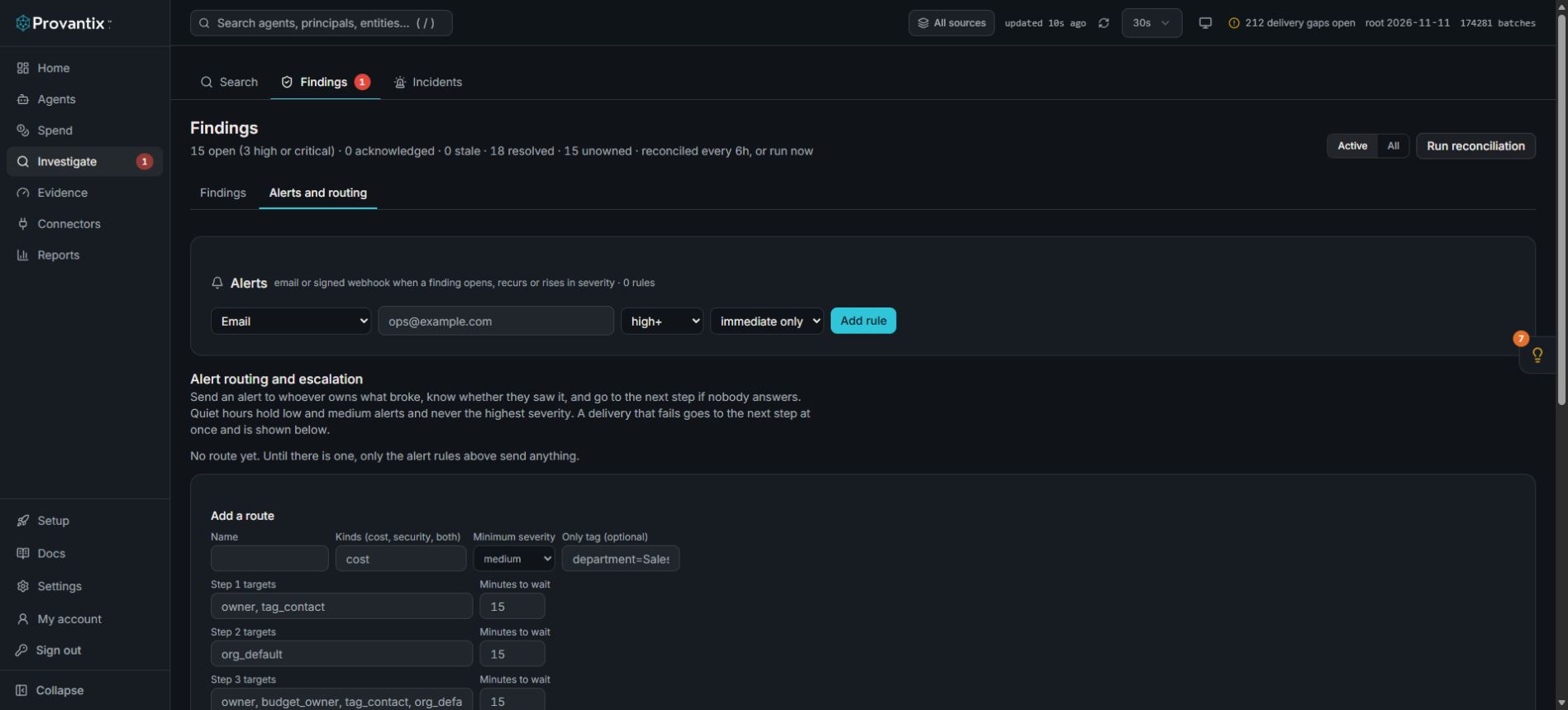
Product capture, 15–16 November 2026. Open the image for full size. Counts and dates are examples from the captured workspace.
Open Findings, then Alerts and routing. The connector configuration is further down this page under Contacts. A connector becomes a route target after configuration; merely opening this screen does not connect a service or send an alert.
What every connector does
- Opens, updates, resolves. The first alert opens a page, a message or a ticket; later states (escalated, reminder, a further finding) update that same one; a condition that clears in Provantix resolves it.
- Reports come back, as the tool's. An acknowledgement in a pager or a click in Slack is stored as that tool's report, with who and when, like a feed acknowledgement. It stops the alert escalating. A report that something was resolved (in the pager, in the ticket) is recorded the same way. Nothing a tool says ever changes a finding's own state. A ticket closed in Jira does not close the alert or the finding: only the condition clearing does.
- Credentials are sealed on the server, shown once, never returned, rotatable, and every use is in the audit log. Give each tool the narrowest permission it offers (below).
- No record content and no personal handles leave in anything it sends.
- A test send and a health state. A connector that fails three times in a row opens a finding ("Alert connector failing") and the alert falls to the next step of its route at once. The finding closes when a send succeeds.
- Rate limits are respected: a short Retry-After is waited out once, a long one is reported as a failure, and bursts are grouped by routing, not dropped.
The six connectors
PagerDuty
- Does: opens an incident on the service the integration key belongs to, severity mapped (high to critical, medium to error, low to warning), with a link to acknowledge and a link to the finding. Updates use the same dedup key so they reach the same incident. Clearing resolves it.
- Permission: an Events API v2 integration key for one service. It can only send events to that service; it cannot read anything.
- Acknowledgements back: add a webhook (v3) subscription for
incident.acknowledgedandincident.resolvedpointing at the address Provantix gives, with its own signing secret, and enter that secret aswebhook_secret. Provantix checks theX-PagerDuty-Signature. - On call: PagerDuty's own on-call schedule decides who is paged. Provantix does not rebuild a rota here.
- Confirmed in the documentation on 2026-11-15: a routing key per integration;
summary,severityandsourcerequired; 202 accepted, 400 do not retry, 429 retry after a few minutes. Relied on from memory, to confirm against the tool: the endpointhttps://events.pagerduty.com/v2/enqueue,triggerandresolvewith adedup_key, and the webhook signature format.
Slack (an installed app, not just a webhook URL)
- Does: the app's bot posts to a channel (or a person, using their user ID) with buttons to Acknowledge and Open the finding. A state change edits the same message and adds a line in its thread; it is not repeated. Cleared edits it to "Cleared" without buttons.
- Permission: a Slack app with the
chat:writescope only, invited to the channel (chat:write.publicis needed only to post to a channel the bot has not joined). Turn on Interactivity and set its Request URL to the address Provantix gives. Enter the bot token (xoxb-…) and the app's signing secret. - Acknowledgements back: a click arrives as a signed
block_actionspayload. Provantix checks the signature (v0, five minutes) and records it as Slack's report with the Slack user, then writes "Acknowledged by …" in the thread. - Confirmed:
chat.postMessage, the scope,thread_ts, theokanderrorresponse, the rate limit of about one message a second per channel, the button payload and the signing scheme. From memory:chat.updatewith a channel andts.
Microsoft Teams
- Does: posts an Adaptive Card to a channel through a Workflows webhook, with buttons that open the acknowledge page and the finding.
- Limits, stated plainly: Microsoft retired the older Office 365 connector webhooks in May 2026. A Workflows webhook cannot edit a message, so each state change is a new card, and its buttons open links rather than send a click back; an acknowledgement happens on the acknowledge page the button opens. A Teams bot app, which could edit messages and take button clicks, is not built.
- Permission: a Workflows "When a Teams webhook request is received" webhook posting to one channel. The URL is the secret. Add a co-owner to the workflow, or it becomes an orphan flow when its owner leaves.
Jira
- Does: creates an issue in the project and issue type you choose, with the summary, the figures and a link to the finding; later states are comments; the issue's status is read back every few minutes and "resolved in Jira" is shown as Jira's report. The issue key is shown beside the finding.
- Permission: an API token for a dedicated user with only Browse projects, Create issues and Add comments in that one project.
- Test: "Send a test" creates a marked issue ("[Provantix TEST] Nothing is wrong: safe to close"); "Check only" reads the project and creates nothing.
- Confirmed:
POST /rest/api/3/issue, the Atlassian Document Format description, the response key, basic authentication with an email and an API token. From memory: comments and the status read (fields.status.statusCategory.key).
ServiceNow
- Does: creates a record in a table (incidents by default) with urgency and impact mapped, later states as work notes, and reads the state back; a state of Resolved or Closed (6 or 7 on a standard instance) is shown as ServiceNow's report. An instance that has changed its state values needs those mapped: say so before relying on it.
- Permission: a dedicated user with only the role needed to create and update records in that table through the Table API, and ACLs limited to that table.
- Confirmed:
POST /api/now/v1/table/incidentwithshort_description, a Location header in the response, and the roles in the example. From memory:result.sys_idandresult.number, the state values,PATCHwithwork_notes.
Opsgenie
- Does: creates an alert with an alias (so updates reach the same one), priority mapped (P1, P3, P5), closes it when the condition clears, and records an Acknowledge or Close from an outgoing webhook as Opsgenie's report.
- Permission: an API integration key (not an account-wide key) with create and update access and no delete. For reports back, an outgoing webhook integration on the team posting to the address Provantix gives.
- Read this: Atlassian ended new sales of Opsgenie on 2025-06-04 and ends support on 2027-04-05, when its APIs stop responding. It is built because it was asked for. Plan the move to Jira Service Management.
- Confirmed on 2026-11-15: only the end-of-support dates. The API details are from memory and must be confirmed against the tool before use.
Email and the generic webhook
Email is unchanged and now carries the acknowledge link and, for a cost alert, the figures: what crossed what, the rate now against usual, the amount so far, the forecast and the named owner.
The generic webhook is signed (x-provantix-signature: sha256=<hex HMAC-SHA256 of the body, keyed by the contact's secret>) and receives JSON, so any other tool can be wired:
{
  "schema": "provantix.alert.v1",
  "event": "opened",                 // opened, updated, escalated, reminder, cleared
  "alert_id": "alr_…",
  "severity": "high",                // low, medium, high
  "route": "Cost everything",
  "step": 1, "of_steps": 2,
  "findings": [{
    "finding_id": "fnd_…", "kind": "cost_budget_forecast", "label": "Budget forecast to be crossed",
    "category": "cost",              // cost, security, both
    "severity": "high", "subject": "agent:agt_a:2026-11", "link": "https://…/findings/fnd_…",
    "detail": "At the cost rate of the last 30 minutes ($120.00 an hour) … will reach its monthly budget of $1000.00 in about 6.9 hours, with $832.00 left of it. Owner: Priya."
  }],
  "acknowledge_url": "https://…/api/alerts/ack/<org>/<token>",   // null once cleared
  "text": "the same alert as plain text"
}
detail is present for cost findings and states the numbers. It never carries record content or a personal handle.
Setup
- On the Findings page, Alerts and routing tab, Connectors, choose the tool, name it and enter its settings and credentials. Provantix seals the credentials and shows the address for reports back once (for PagerDuty, Opsgenie and Slack). Give it to the tool.
- Send a test. A PagerDuty or Opsgenie test opens a page at the lowest severity and resolves it at once; a Slack test posts a marked message; a Teams test posts a marked card; a Jira or ServiceNow test creates a marked ticket (or use "Check only").
- Use the connector in a route's step as
contact:<name>. Send the route's own test. - When you have checked it against a live account, record that. The status then reads "checked against a live account" with the date.
What is proven
| Connector | State | Documentation read |
|---|---|---|
| PagerDuty | documentation only | 2026-11-15 |
| Opsgenie | documentation only | 2026-11-15 |
| Slack | documentation only | 2026-11-15 |
| Microsoft Teams | documentation only | 2026-11-15 |
| Jira | documentation only | 2026-11-15 |
| ServiceNow | documentation only | 2026-11-15 |
"Documentation only" means built from the tool's published documentation and tested against responses shaped from it. The build did not wait for paid accounts. The product shows the same state for each connector, and an admin's live check replaces it for that connector.
API
GET /api/alert-connectors (the tools, what each needs and the permission to give it, the proof register and the status of each connector). POST /api/alert-connectors to add one; POST /api/alert-connectors/<id>/rotate, /test (mode send or check) and /live-checked (admin). GET /api/findings/<id>/external-refs returns the tickets, pages and messages made for a finding with each tool's reports.
Limits
- Nothing here has been run against a live tool. Expect to find differences in the first live check, and record them.
- Teams cannot edit or take clicks (above). Jira and ServiceNow status is read every five minutes, not pushed.
- ServiceNow state values and Jira workflows differ by instance. "Resolved" means Jira's "done" category and ServiceNow's state 6 or 7.