People using AI directly: seats and subscriptions
A large part of what an organization spends on AI is people using assistants directly: chat products on a per-seat plan, coding assistants, AI features inside other software. None of it passes through an agent Provantix can see, and a seat has no cost per token. This page covers how Provantix records those subscriptions, shares their cost with the people and departments that hold the seats, and shows paid-for seats against seats used.
In the product
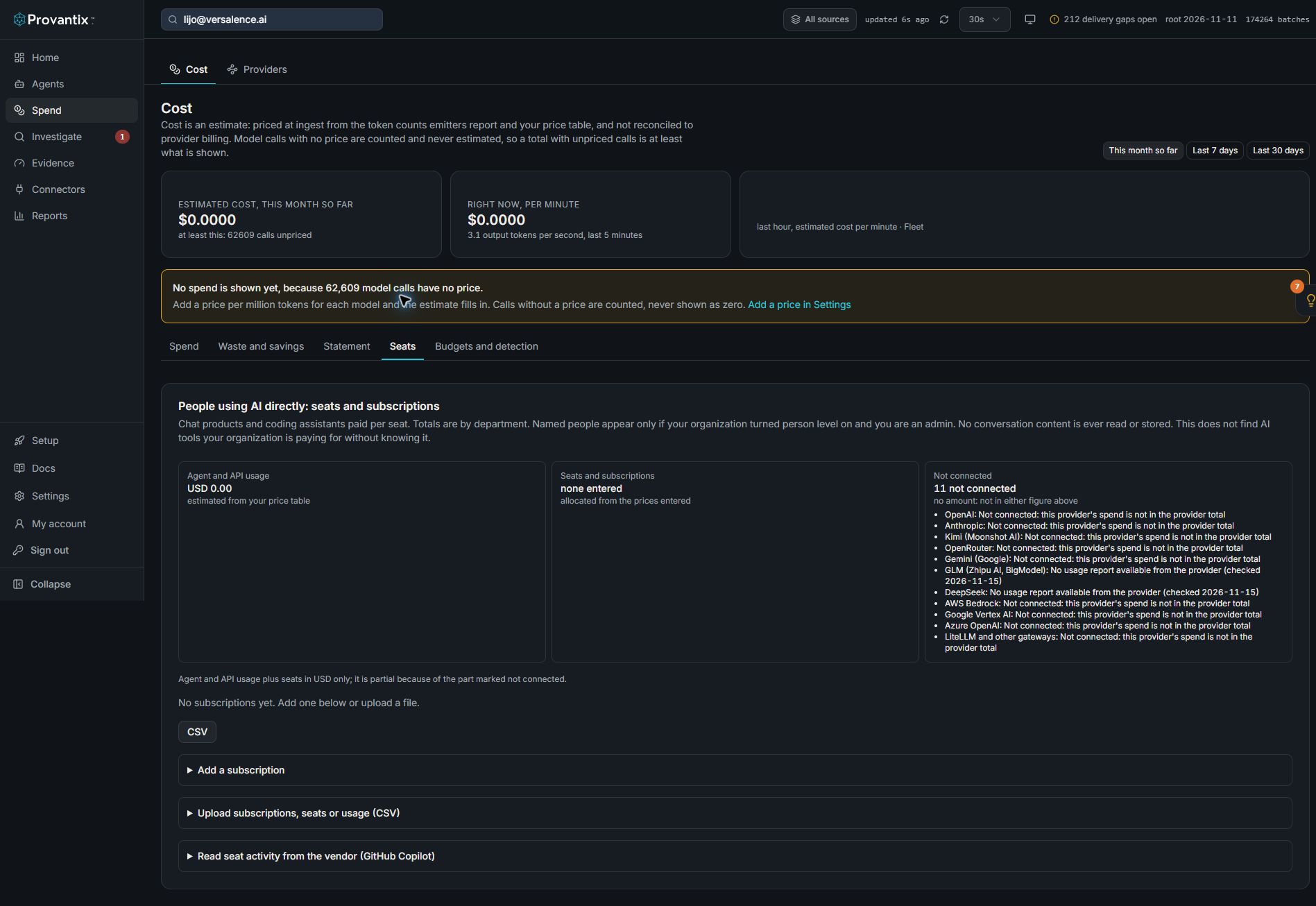
Product capture, 15–16 November 2026. Open the image for full size. Counts and dates are examples from the captured workspace.
Open Cost, then Seats. Agent and API usage, seats and subscriptions, and not-connected providers are shown separately. This example has no subscriptions entered; it cannot establish that the organisation has no seat spending.
Privacy: read this first
This is data about named employees' work habits, so Provantix keeps as little as it can.
- Department totals are the default. A named person appears only when your organization has turned person-level views on (the people setting) and the viewer is an admin. Provantix never turns person level on by itself. Whether to, under your own policy and local law, is your organization's decision and responsibility, including any review with employees or their representatives. Provantix supports both choices and shows only what it receives.
- No conversation content is ever read. Where a vendor's interface could return content, Provantix does not request it.
- No name and no email address is stored. An email address or an employee identifier you enter or upload is turned into a one-way hash (a handle: SHA-256 of the lower-cased identifier, shortened) when it arrives, the same scheme the people directory uses, and the original is not kept. The hash is not secret-keyed, so someone who already holds a list of your employees' email addresses could test whether one of them is in the data. Treat handles as personal data and keep access to them limited. A vendor's own user name is kept only as its hash. The uploaded file itself is not stored.
- Small departments are folded. A department with fewer people than your small-group minimum is folded into a shared line, so one person cannot be read out of a small team.
- The page, the API and the CSV follow the same rule.
What is stored per person, and nothing else:
| Stored | Why |
|---|---|
| A handle (a one-way hash of the identifier) | So the seat can be matched to the directory and its department |
| The hash of the vendor's user name, where the vendor gives one | So the vendor's usage can be matched to the seat |
| The days a seat was held | To share its cost over those days |
| Whether the seat was used in a month: yes, no or not reported | For paid against used |
| A count of volume where the vendor gives one (messages, sessions, requests) | Shown beside use |
| An overage amount and its currency | Overage |
"Seat not used in the period" is a statement about a seat, not about the person. A person may have used another tool, been away, or have a seat for something they use rarely. Provantix never labels a person as inactive.
Subscriptions
Enter each subscription by hand or upload it (CSV): product, vendor, plan, seats bought, price per seat for the billing period (monthly or annual), currency, renewal date, owner and the date it starts. A change of seats or price is a new version from a date you give; earlier days keep the earlier terms.
An annual price is shared as a twelfth for each month. A seat's cost is shared over the days in the month. These are allocations of the price you entered, not invoices, and each figure says it was entered by hand or uploaded.
Seats
A seat is given to a person from a date and ended on a date, by hand, by upload, or as the vendor reports it. Its cost goes to the person holding it, and so to their department on the last day of the period. A seat nobody holds is a cost line of its own (unassigned seats). A seat holder who is not in the directory is a line of their own as well; none is dropped or spread. If more seats are held than were entered as bought, the page says so.
Usage of the seats
Where a vendor offers an admin or analytics interface, Provantix can read whether each seat was used in the period. Where it does not, you can upload usage or enter it by hand. A subscription with neither says seat cost only, usage not available; its seats are never shown as unused.
Per subscription and per department:
- seats paid for against seats used, the seats not used in the period and what they cost;
- cost per active user: the whole cost of the subscription (including unassigned and unused seats) over the seats known to be used. Seats that did not report make this a high figure, and the page says so;
- overage: usage billed on top of the seat, by department (and by person where permitted).
Each figure names its source (entered by hand, uploaded, or reported by the vendor) and the date.
GitHub Copilot
The first vendor connection is GitHub Copilot. Provantix reads only the list of Copilot seats in your GitHub organization: who holds one and the time of that seat's last activity. It does not read the usage metrics, prompts, completions or any code. It needs a token that can read Copilot billing for the organization (the manage_billing:copilot scope on a classic token, or the organization "Administration" read permission on a fine-grained token). The token is stored sealed and shown once.
A seat is used in a month when its last activity is in that month. Usage is recorded for the month in which it is read, from the day of the first read. A month that was never read shows "no usage recorded", and a month read part-way through is flagged, because a seat first read late in the month can look unused for the days before the read. The seat list does not include overage; enter or upload it. This connection was built from GitHub's documentation and has not been checked against a live account. Other vendors are entered by hand or uploaded, or have no usage interface Provantix reads yet.
The organization's total, in three parts
The Cost page (its Seats tab) shows the total as three labelled parts, not one number:
- Agent and API usage: the estimate from your price table, for the period.
- Seats and subscriptions: the allocated cost of the prices you entered, per currency. Currencies are never added together.
- Not connected: providers that are not connected and subscriptions with no usage interface. No amount: they are in neither figure above.
A combined figure in USD is shown for the first two, with a note when it is partial.
What this does not do
- It does not find AI tools your organization is paying for without knowing it. That needs expense or network data, which Provantix does not read.
- It does not say whether a seat was worth its price, or judge any person's use.
- It does not read or store conversation content.
- A vendor with no usage interface shows seat cost only.