Cost shows zero
What you're seeing
The agent's detail page shows $0.00 this month, the Home page cost tile is flat at zero, and the Model usage and cost report is empty — while the same agent has hundreds or thousands of actions in Investigate.
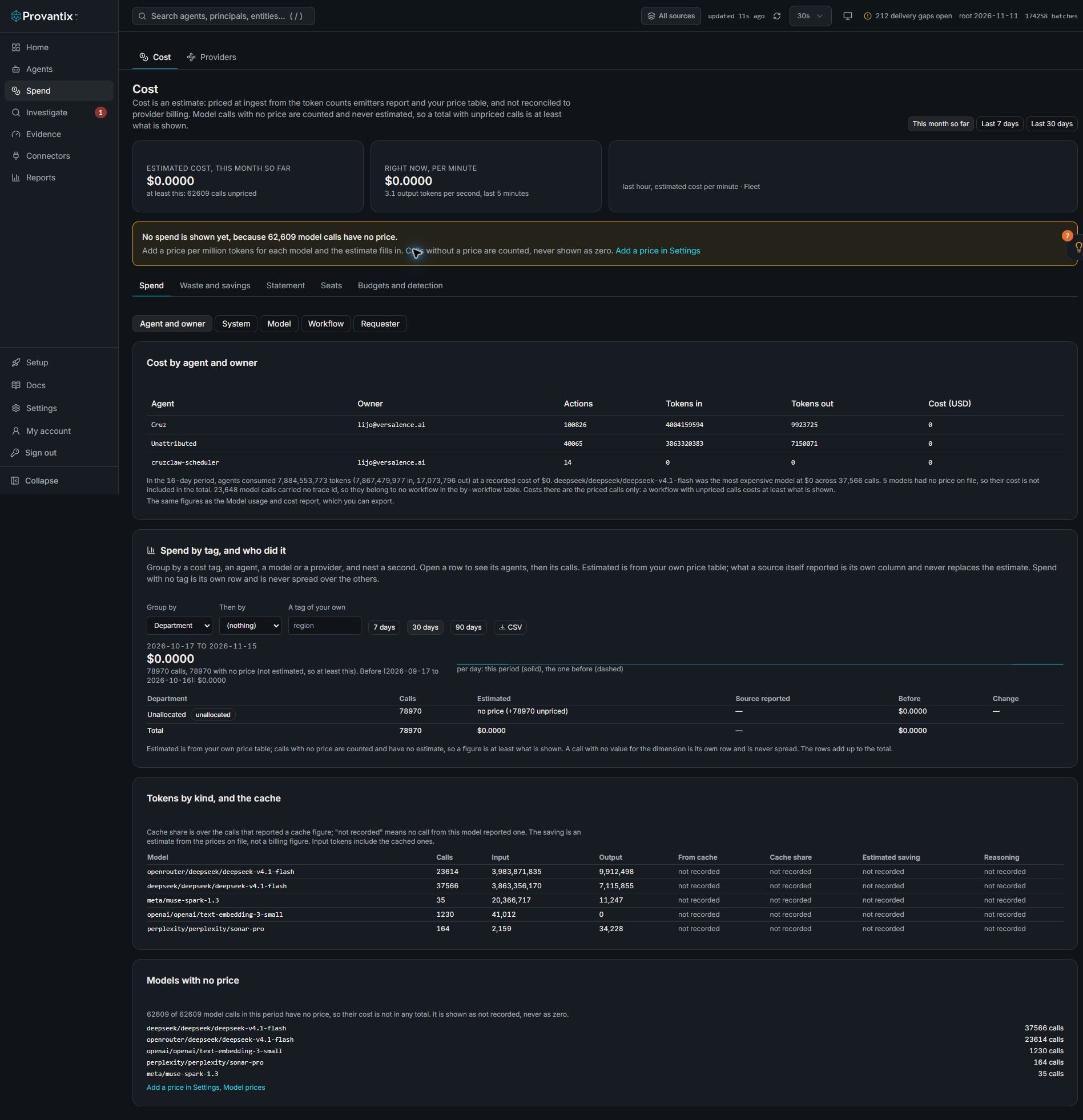
Product capture, 15–16 November 2026. Open the image for full size.
The captured workspace has token counts but no model prices. Read the unpriced-call warning before interpreting the zero estimate; it does not mean the calls were free.
Two different things that look the same
- The emitter reports no usage. Nothing can be priced. This page's first sections.
- Usage is reported but the model has no price row. The Brief shows $0 spend and "1 unpriced model" side by side. That is not zero: it is unknown. Every call to that model is unpriced, so every estimate falls to nothing while the token counts are real. See The model has no price below.
What it means
Almost always: the emitter is not reporting model usage. Cost is computed at ingest from the token counts the emitter reports and your price table. Actions flow without token counts → attribution works, cost is zero. It does not mean the agent is free; it means the platform cannot yet price it.
Less common causes:
- No price row for the models used — the emitter reports tokens, but the model does not match any entry in your price table, so ingest cannot price it. See below.
- Wrong model name spelling —
gpt-4ovsgpt-4o-2024-08-06vsazure/gpt-4oare different strings; a price table entry that does not match the reported name prices nothing.
What to do
- Confirm the cause first: open any recent record drawer and look for the model section. No model field at all → cause one. Model field present with tokens → cause two or three.
- If the emitter reports no usage: upgrade the emitter/SDK to a version that reports token counts (see the Node.js SDK reference —
emitOtelSpanandemitAARboth carry usage when provided), or route the model calls through an OTLP source that does: AI gateways (OpenRouter and similar) report usage and cost per call on every request. - If a price is missing: add a price row for the model (the next section). Past estimates for that model are recalculated the moment you add it, and new records are priced as they land.
- Sanity-check after a day: the agent's cost badge and the Home cost tile should move, and Model usage and cost should show tokens and p95 latency per model.
The model has no price
An organization admin adds a row under Settings, Cost tab, Model prices: provider, model id, and the provider's rate per million tokens for input and output. Copy the provider and model id exactly as the records carry them (open a record in Investigate and read its model section), because the row only matches on those exact strings. Saving reprices past records for that model. The same thing through the API, which takes rates per thousand tokens:
curl -X POST https://app.provantix.tech/v1/prices \
  -H "authorization: Bearer <token>" -H "content-type: application/json" \
  -d '{"provider":"openrouter","model_id":"deepseek/deepseek-v4.1-flash","input_per_1k":0.0002,"output_per_1k":0.0004}'
Rates are per 1,000 tokens. Providers usually quote per million, so divide by 1,000: a rate of $0.20 per million input tokens is 0.0002. The values above are an illustration of the shape, not a real price: take the rates from your provider's pricing page or contract. effective_from (a YYYY-MM-DD date) is optional and defaults to today.
The response says how many records were repriced. Re-read the Brief: spend is now a number, the unpriced-model line is gone, and the top agents by spend appear.
Reading the token shape while you are here
Unpriced does not mean unmeasured. The tokens are recorded, and they often show something worth knowing before you price anything: an average of, say, 180,000 input tokens against 180 output tokens per call means each call resends a large context (history, documents or tool output). That is where the spend will come from, and it is the first thing to look at for savings, for example trimming the context or using the provider's prompt caching if it offers it.
What good looks like
Cost per agent matches your provider bill within rounding, the model mix report shows the real distribution, and the Chargeback CSV attributes spend to owners. The page states the honest caveat itself: cost is estimated at ingest from reported token counts and your price table — it is not reconciled to provider billing. Provider invoices remain the source of truth; this number is the per-agent, per-day estimate you act on.