Alert routing and escalation
The alert rules send a finding to an email address or a webhook, with quiet hours and a daily digest. That is a notification. Getting someone out of bed in time needs three more things: sending to whoever owns the thing that broke, knowing whether they saw it, and going to someone else when they did not. Routes add them. The older rules are unchanged and keep working beside routes.
Routes are on the Findings page, on the Alerts and routing tab, under "Alert routing and escalation". They read the same findings feed as everything else, so the cost findings that are detected within minutes page people as they happen. Alerts start from the moment the first route is created: findings that were already open are not paged.
In the product
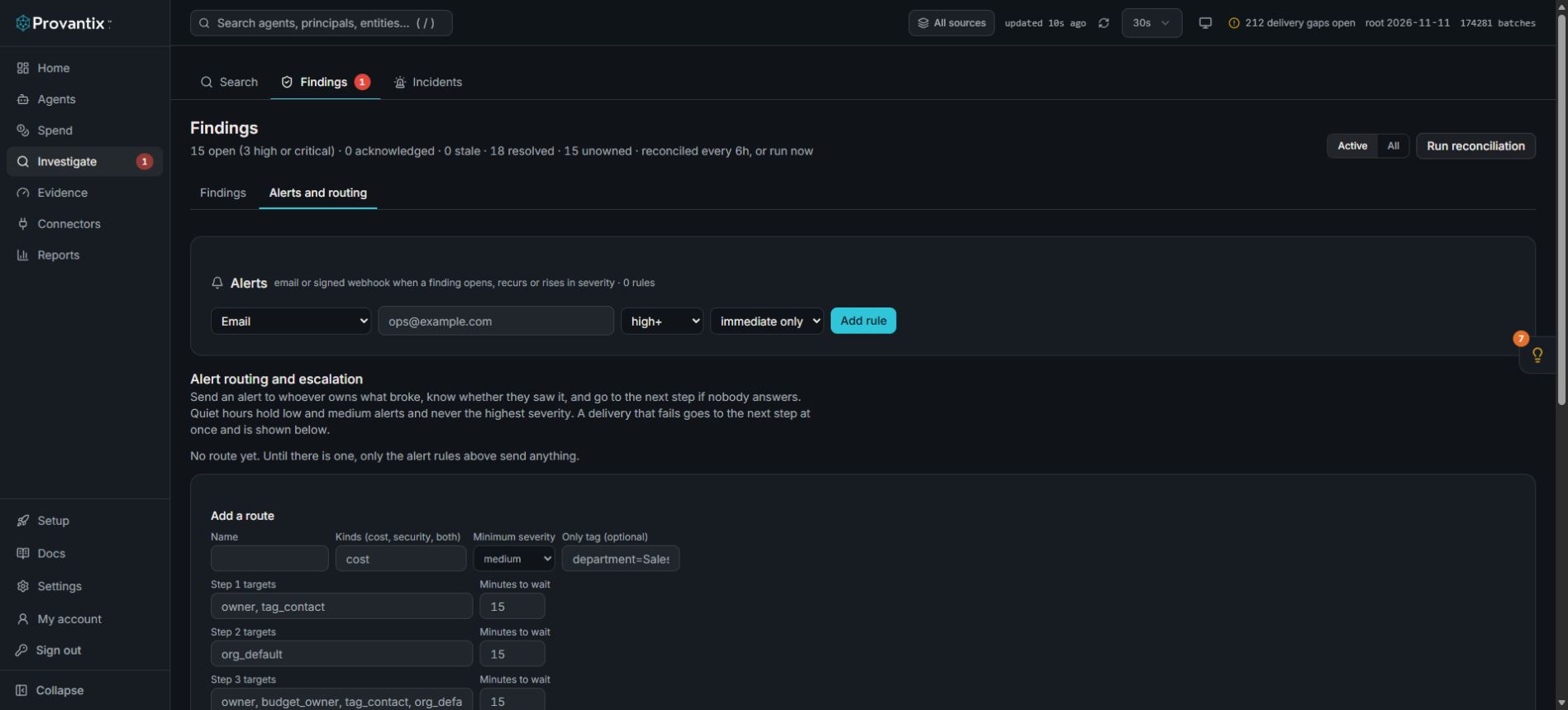
Product capture, 15–16 November 2026. Open the image for full size. Counts and dates are examples from the captured workspace.
On Findings, select Alerts and routing. Alert rules and escalation routes are separate controls. This example has zero rules and no route, so the displayed form is setup, not evidence of a delivered notification.
Routing
A route matches an alert by:
- Kind: cost, security, or both. Cost covers the spend, budget, cache and provider-cost findings. "Both" is the finding that carries a security finding and abnormal spend together. Everything else is security. A cost alert can go to finance and the owner; a combined one also to security, by listing
costandboth(andsecurity) on the routes you want. - Severity: at or above a minimum.
- A tag, if you set one: only alerts about that department, product or other tag value.
A route's steps list targets, each of which is one of:
| Target | Who it is |
|---|---|
owner |
The owner of the agent the alert is about (an email address, or the name of a contact). |
budget_owner |
The named owner on the budget a budget alert is about, matched to a contact by name or used as an email address. |
tag_contact |
The named contact for the alert's department or product (set under tag contacts). Add :department to use only that dimension. |
org_default |
The organization's default contact. |
contact:<name> |
A named contact. |
rota:<name> |
Whoever is on call this week on that rota. |
email:<address> |
A plain email address. |
When none of a step's targets can be resolved (an agent with no owner, no contact for the tag), the organization's default contact is used and the log says so. If there is no default either, that counts as a failed delivery.
Contacts are an email address or an https webhook. A webhook's signing secret is sealed at rest and shown once; messages to it are signed (x-provantix-signature). Rotas are a list of contacts and a start day, with a shift length: a simple "who is on call this week". Provantix does not rebuild a pager product: where you have a pager tool's own schedule, make its service a contact and send to that.
Acknowledgement
An alert can be acknowledged three ways, and each records who and when:
- From the message. Each message carries a link. It opens a page with a button, because mail scanners open links, and the button acknowledges. The link names the notification it was sent in, so the acknowledgement is recorded as the recipient it was sent to.
- From the product, on the alert.
- By the receiving system, through a feed acknowledgement on any of the alert's findings.
An acknowledged alert stops escalating and stops reminding. The finding is acknowledged too, so the response loop sees the first response. A cleared message still goes out when the condition ends.
Escalation
A route has one to three steps. Each step has a wait: if nobody has acknowledged within it, the next step is notified. After the last step the alert is re-notified at an interval (30 minutes by default) up to a cap (3 by default), and then shows as exhausted, still open. When the condition resolves, a cleared message goes to everyone who was alerted.
If a step cannot be delivered, because no target could be reached, the next step is notified at once, without waiting. If the last step fails too, the alert is undeliverable and a high-severity finding, "Alert could not be delivered", says why. It closes with the alert. Nothing fails silently.
Hygiene
- Deduplicated. One notification per alert, step and target, claimed before sending, so a re-run never sends twice. A repeated event for an active alert adds nothing.
- Grouped. Findings with one cause arrive as one message: an agent's spend rate, failure burn and security-and-cost findings together. A later finding for an alert nobody has acknowledged is told to the step it is at; once someone has acknowledged, it is kept quiet.
- Quiet hours (UTC, per route) hold low and medium alerts and send them when the hours end, unless they have cleared. They never apply to the highest severity: a high alert is always sent at once. This is stated on the route.
- A test per route sends a marked message ("TEST ... Nothing is wrong") through every step. Targets that depend on a real alert, such as an owner, are reported, not sent.
What a message says
What, where, how much and a link. For a cost alert the message carries the finding's own statement: what crossed what, the rate now against usual, the amount so far, the forecast and the named owner. It also says which step it is and when it escalates. It never carries record content, a personal handle or another person's address.
The delivery log
Every send, reminder, escalation, cleared message and test is in the log with its outcome, and every failure with its reason. It shows contact names and channels, never addresses or tokens.
API
GET /api/alert-routingreturns routes, contacts, tag contacts, rotas and settings. Admin actions are audited.POST /api/alert-routing/contacts,.../tag-contacts,.../rotas,.../routes;POST .../routes/<id>/test|end|enable|disable;PUT .../settings(default_contact,renotify_minutes,renotify_cap).GET /api/alert-routing/alertsand/log.POST /api/alert-routing/alerts/<id>/acknowledge.
Limits
- Reading the feed and moving alerts on happens every minute, so an alert is paged within about a minute of its finding.
- An email contact reaches the person only as well as the platform's mailer does. If it is not configured, delivery fails and the next step is used.
- A budget owner is only a name unless it is an email address or matches a contact.
- Quiet hours are in UTC.