The cost statement: a closed, signed account of a month
A cost statement is a month of AI spend, closed, so it stops moving. Finance can rely on a closed statement the way it relies on a closed ledger period: the figures were frozen at the moment of close, and anything that changes afterwards is shown as a separate, labelled adjustment instead of quietly rewriting the number.
This is cost evidence for AI and AI agents only. It supports an audit. It is not an audited financial statement, and nothing in it says it is.
In the product
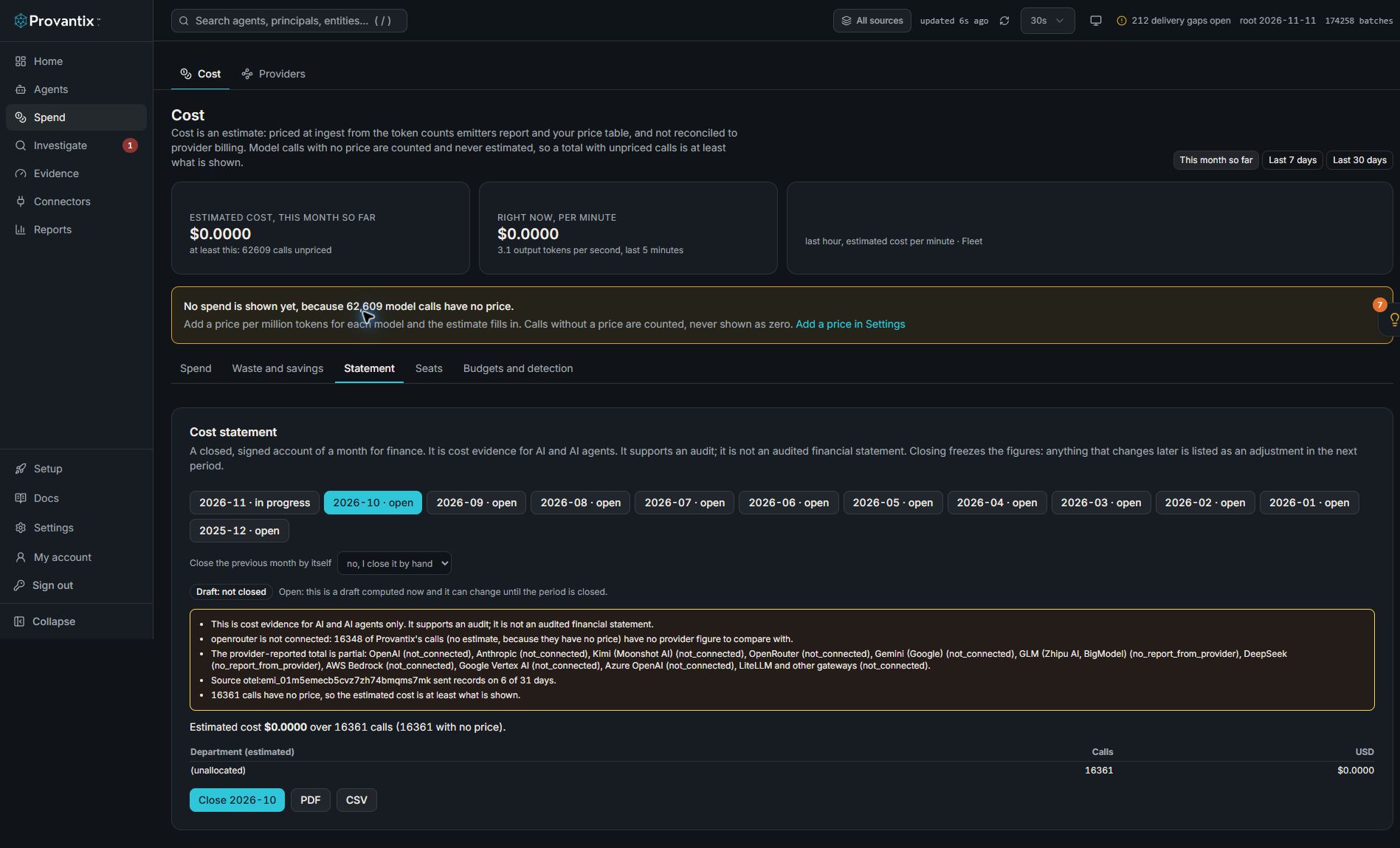
Product capture, 15–16 November 2026. Open the image for full size. Counts and dates are examples from the captured workspace.
Open Cost, then Statement, and choose a month. This screenshot is explicitly Draft: not closed. Its warnings identify unpriced calls, incomplete provider figures and source coverage. A draft can change; it is not an example of a closed or verified statement.
Who this page is for
If you work in finance or audit, read this page top to bottom: it says what each figure means, how it was worked out, and what the statement cannot tell you. If you are the person who closes the month, the steps are under "Closing and reopening".
The three kinds of figure
Every figure in the statement names its kind, so a reader never has to guess where a number came from.
| Kind | What it is |
|---|---|
| Estimated | Worked out by Provantix from the tokens a source reported and the price table the organization keeps (Provantix ships no prices). It is an estimate, not a bill. |
| Provider-reported | The provider's own figure, as the provider reported it when it was fetched. In the provider's own currency. It is not an invoice. |
| Reconciled | Provantix's tokens and cost for a settled day compared with the provider's, within the tolerances the organization set. The result says how much is explained, how much is untracked, and how much has no price. |
What is in it
- Totals by provider and model. Calls, tokens and estimated cost, with the provider's own figure beside them.
- Reconciliation. Per provider: the share of the provider's tokens that Provantix's records explain, the share that has no Provantix record ("untracked"), and the share of Provantix's calls with no price.
- Allocation. By department, cost center, product and agent, from the tags resolved on each record. Each allocation adds up to the total. A call with no value is its own "(unallocated)" line and is never spread over the others. A person-level view is included only where the organization has allowed it, and small groups are folded as everywhere else.
- Budgets. Spend against each budget cap, and the days a cap was reached.
- Avoidable cost. The cost of repeated and failed calls and where the tokens go, each an estimate with its assumption. Estimated savings and checked savings are shown apart and never added together.
- Incidents with a cost. The figure frozen when each incident closed.
- Coverage. The days each source sent records and each provider connection has figures. A gap is stated, because a clean statement over a period in which a source was silent proves less than it appears to.
- Method. The formulas, the price table rows in force, the reconciliation tolerances and any currency rate with the date it was entered.
- What this statement does not show.
A tenth part, adjustments, carries what earlier periods needed corrected.
What you are told on the first page
The first page lists, before any figure, what a reader must know: a provider that is not connected, a provider whose tokens are partly untracked, days that had not settled, a source that was silent for part of the month, calls with no price (so the estimate is at least what is shown), and any adjustments carried in.
Closing and reopening
A period can close once it is over. Closing:
- freezes the figures as cells (by day, agent, provider, model and the three tags), with the prices, the provider figures and the reconciliation as they stood;
- records who closed it and when (or that the schedule did);
- cannot be done twice. To change a closed month it must be reopened, which needs a reason that stays on record. The earlier statement is kept as superseded and the next close is version 2.
An organization admin can let the schedule close the previous month a chosen number of days after it ends (0 to 28). A scheduled close says so on the statement. A month with no records is not closed.
Adjustments
After a close, four kinds of change can fall inside the closed month. Each is recorded, points at the figure it corrects, and lands in the next statement that closes. None of them changes the closed statement.
| Kind | Meaning |
|---|---|
| Late records | Records for a day in the closed month that arrived after the close. |
| Re-tag | The same calls and cost moved between tags (for example a corrected department). It moves cost between lines and does not change the total. |
| Price correction | The same calls now priced differently, because a price row was corrected. |
| Provider restatement | The provider changed a day's figure after the statement recorded it. |
| Records removed | Records that were in the closed month and are no longer there. |
Each adjustment is recorded once. Changes are looked for in the latest 24 closed months. A reopen makes the adjustments against the superseded version moot, because the month is then redone from the records as they now are.
Downloads
- Signed bundle: the statement, the cells every total adds up from, a CSV, a readable page, one chargeback file per department and a README. Every file is in the signed manifest with its hash.
- PDF: a readable copy, marked as a draft when the period is not closed.
- CSV: one line per figure with its section and kind.
- Chargeback files: one per department, each with a total line. "(unallocated)" is its own file, so the files add up to the total.
Checking a bundle
The published verifiers (Node and Python in the verification kit, and the browser verifier at provantix.tech/verify) check every file against the signed manifest and the signature, and then add the figures up from statement/cells.json: the totals by provider and model, each allocation, the cover total and the chargeback files must equal the stated total. If a cell, a stated total or a chargeback file was changed, the check fails and names which one. This holds even when someone rebuilt the manifest to match, which is why the arithmetic is checked as well as the hashes. A verifier from before this check still checks the files and the signature, and does not add the figures up. The kit has a sample statement and the same statement with one figure changed; check a cost statement yourself walks through both.
It cannot check that the cells are the right figures. They are the estimates frozen at close, from the organization's own price table. It does not read an invoice and cannot reach the provider. A bundle that passes proves the files are the ones issued and that the stated totals are what the cells add up to. It does not prove the figures are correct, and it is not an audit.
What the statement does not show
- Anything outside AI and AI agents.
- What the provider billed or what was paid.
- Spend by a provider Provantix is not connected to, by a source that sent nothing, or calls that were never recorded, other than naming them where known.
- Whether any spend was necessary, correct or worth it. Cost per outcome is a separate report.
- A cause for any difference between Provantix's figures and a provider's.
- That the figures are audited.
Where it is
Open Spend, then the Cost page and its Statement tab. Choose a month. Closing, reopening and the schedule are for organization admins; anyone who can read the Cost page can read a statement and download it.