Connect Razorpay as a destination
Provantix can read the payment system an agent acts on, and compare that system's own records with what the agent claims. The first destination is Razorpay, for refunds. This page says how to connect it, what the connection reads, what it never does, and what you see when something goes wrong.
In the product
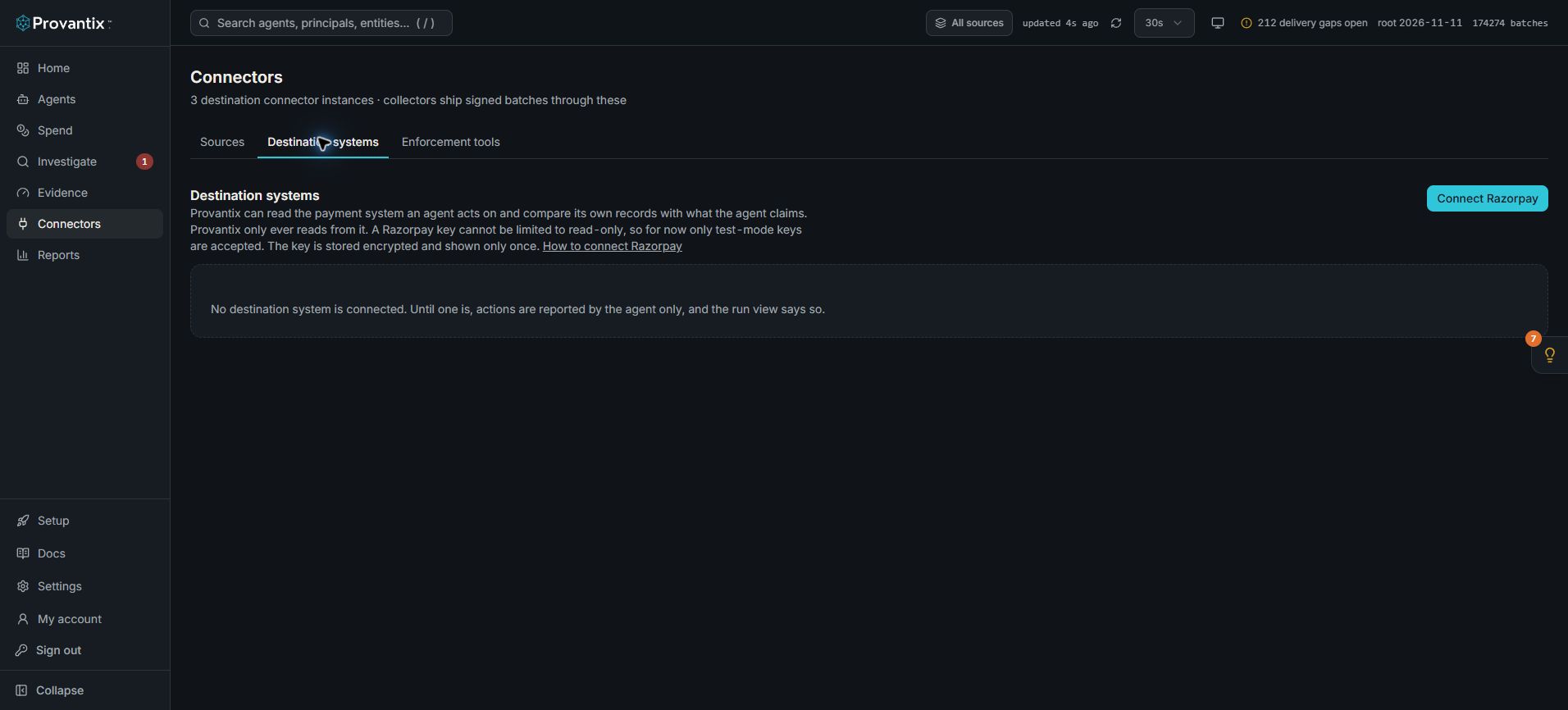
Product capture, 15–16 November 2026. Open the image for full size. Counts and dates are examples from the captured workspace.
Open Connectors, then Destination systems, then Connect Razorpay. The screen states that only test-mode keys are accepted. This capture stops before entering a key and shows no connected destination.
Why connect a destination
An agent's own report says what the agent says it did. A refund that Razorpay itself recorded is a second, independent statement. With a destination connected, each refund the agent claims becomes one of five states: destination-confirmed, conflicting, pending, unverified or agent-reported. See One run, as a chain and Coverage. Without one, the run view says self-reported only.
One thing to know first: a Razorpay key cannot be limited to read-only
A Razorpay API key is a key id and a key secret that work for the whole merchant account. Razorpay does not offer a read-only key; a read-only scope exists only in its partner OAuth. So:
- Provantix's connection is read-only by construction. It can only send read requests, and it has no code that creates, changes or refunds anything.
- The key itself can do more. Anyone who holds it can use it for more than reading.
Because of that, only test-mode keys (rzp_test_…) are accepted for now. A live key is refused. Connecting live accounts needs a credential that can be limited to read-only, which Razorpay offers through partner OAuth. That is not built.
Connect it
In the Razorpay dashboard, open Account & Settings, API keys, and generate a test-mode key. The key secret is shown only when the key is generated, so copy it then.
On the Connectors page, under Destination systems, choose Connect Razorpay. Enter a name, the key id and the key secret, and say which tool or action to check (for example issue_refund: a refund is recorded as a tool call, and the scope matches either the tool name or the action type) and what the agent calls the system (for example razorpay). Provantix tests the key with one read of a refund and shows the result.
The secret is shown only here. It is stored encrypted, never shown again, never written to a log, and never sent to an AI model. The page keeps only the last four characters of the key id so you can tell which key it is.
What the connection reads
- Refunds, by creation time, in pages: the id, amount, currency, status (pending, processed or failed), the payment it belongs to, the time Razorpay created it, and the
provantix_action_idin itsnotes. - A single refund by id, when an agent cites one, to ask Razorpay whether it exists.
It collects every five minutes, re-reads the last hour each time (so a record that shows up late is still caught), and asks again about refunds that were still pending, because a refund that later completes or fails keeps its creation time. For each refund it keeps where it came from: the call, when it was fetched, Razorpay's request id, the id of your key (never the secret), and a hash of what Razorpay returned. A processed refund is recorded as succeeded, since Razorpay documents it as the final state.
How an agent makes its refund checkable
When the agent creates the refund, put the Provantix action id in the refund's notes as provantix_action_id, and use the same value in the claim (ext.claim.action_id). The refund and the claim then match by id. Without it, Provantix can still match by the refund id the agent cites, and, more weakly and only when nothing is ambiguous, by the same payment, amount and time.
What it never does
- It never writes. The connection can only read.
- It never treats a destination that is down as a fault of the agent. If Razorpay is unreachable, throttling requests, or the collection does not finish, the connection shows not finishing, the period is recorded as not collected, and the actions in it stay pending or become unverified with the reason. Nothing is raised as a finding about the agent.
- It never says "no record found" for a period it did not collect. A pull counts only when it finished without an error.
- It never shows the secret again.
Revoking
- In Provantix, choose Revoke on the connection. The stored key is wiped, nothing more is collected, and the actions that depended on it become unverified, with the reason the connection to the destination system was revoked or rejected. Also regenerate or delete the key in Razorpay.
- In Razorpay, if you regenerate the key, the next collection is rejected. The connection shows credential rejected or revoked, and the affected actions become unverified in the same way. Connect the new key, or choose Test if the old one works again.
What was already confirmed against a collected record stays as it was.
Try it with the test agent
To see the whole path with a real Razorpay test payment, there is a small stand-in agent, app/agent-sdk/examples/razorpay-refund-agent.mjs. It is the agent, not the connector: it writes to Razorpay test mode (a live key is refused), issues a refund on a captured test payment you give it, puts the Provantix action id in the refund's notes, and records its own claim. Create a test payment in the Razorpay dashboard in test mode (for example with a payment link paid with a test card), then:
RAZORPAY_KEY_ID=rzp_test_... RAZORPAY_KEY_SECRET=... node app/agent-sdk/examples/razorpay-refund-agent.mjs https://app.provantix.tech <admin token> pay_XXXX --scenario normal
Each scenario makes a case a reviewer will be shown:
| Scenario | What it does | What you should see |
|---|---|---|
normal |
a refund and a claim that matches it | destination-confirmed |
claim-only |
a claim with no refund behind it | unverified, once the destination was collected for the period |
refund-only |
a refund with no claim | a change nobody claimed |
wrong-amount |
a refund, and a claim stating a different amount | conflicting |
duplicate |
two refunds for one action id, one claim | conflicting |
Then connect Razorpay in Connectors, add the scope (the tool issue_refund on razorpay), and choose Collect now.
Check it yourself
The connector is tested against responses that follow Razorpay's API reference. One live check against your own test account is in ledger/scripts/razorpay-live-check.mjs. It reads, it never writes, and it needs your test key pair in the environment:
RAZORPAY_KEY_ID=rzp_test_... RAZORPAY_KEY_SECRET=... node ledger/scripts/razorpay-live-check.mjs
It prints how many refunds it read, the mapping of the newest one, and the three response shapes the tests assume, so you can compare them with what Razorpay actually returns.
What a connection does not show
A refund that Razorpay recorded is Razorpay's own statement. Provantix compares it with the agent's claim and says whether they agree. It does not show that Razorpay's record is true, that a refund absent from a collected period did not happen, or that the person who approved it was the right person.