The AI Insider
The AI Insider is the analytics side of Provantix. A light bulb on the right edge of every page opens a panel that tells you what your data says, where to improve, and what needs your decision, without leaving the page you are on.
It reads what Provantix already holds: daily totals per agent and system, failures, tokens, cost, latency, trace ids, delivery gaps, ownership and coverage. It turns them into a short reading of the week, a handful of insights each backed by numbers and linked to the records behind it, and the few decisions that change your records. It does not act on its own. Every change needs a person to click.
In the product
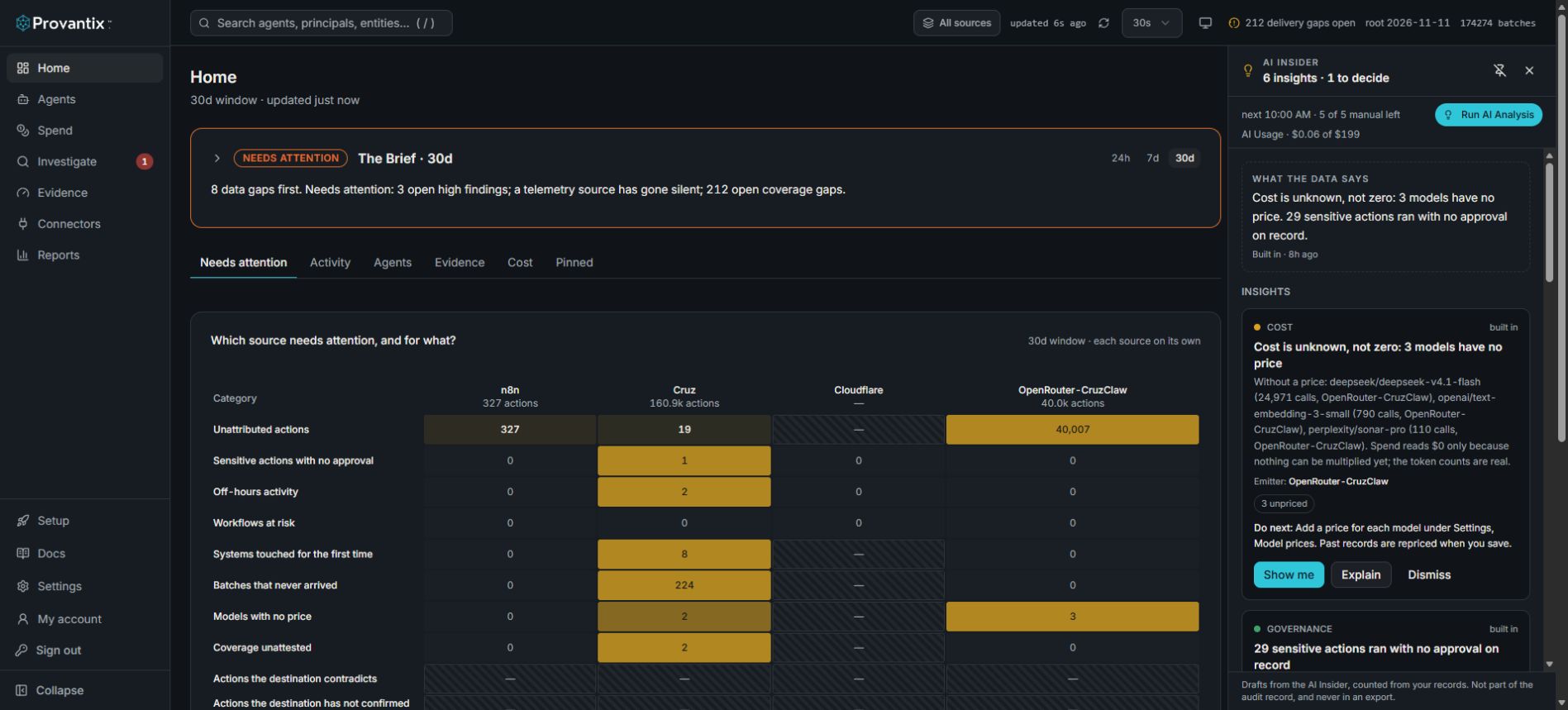
Product capture, 15–16 November 2026. Open the image for full size. Counts and dates are examples from the captured workspace.
Open the lightbulb at the right of the workspace. Read the analysis age and supporting figures, then use Show me to inspect the underlying screen. The panel identifies its output as drafts, not part of the audit record or exports. An older analysis can differ from current live counts.
What you see
From the top of the panel down:
- What the data says. One or two sentences on the most important message across everything below.
- Insights. Each is a statement with its numbers, a Do next line, and three buttons. This is the main thing.
- Needs your decision. The few changes to Provantix's own records the Insider proposes, such as registering an unrecognised identity as an agent.
- Alerts. One line, such as 5 alerts need attention, see Findings. These are warnings that already appear on the Findings page, so they are folded away. Open the line to deal with them from here.
- Recently handled. What you dismissed, approved, denied or acknowledged in the last week.
Insights
An insight belongs to an area, shown by a coloured dot:
| Area | What it says | Example |
|---|---|---|
| Activity | Where the work goes: volume against last week, the busiest agent, the largest kind of action. Always shown. | 12,400 actions this week, up 38% on last week. Cruz accounts for 97% of it. |
| Reliability | Where calls fail, and which tool, system or model is slow, and which running agents cannot be called healthy. | send_mail is where the failures are: 40% of its 200 calls failed. |
| Reliability (agent state) | Running agents that are degraded (the source delivers and the agent missed its expected run, or its error rate or latency is rising), uncertain (a source it reports through has batches that never arrived, so a stopped agent cannot be told from lost telemetry) or unknown (never seen, or quiet with no expected interval declared). Agents that are healthy, or paused, proposed or retired, are not listed. | 2 of 9 running agents are uncertain: a source it reports through has batches that never arrived. |
| Cost | Models with no price, which makes spend unknown rather than zero, large moves in spend, and context resent on every call. | Each model call sends about 180,000 tokens and gets about 180 back. |
| Data quality | Whether the data can be trusted: batches that never arrived, which emitter lost them, how long the gaps are (short ones suggest numbers used up by retries, long runs an outage) and when they cluster, model and tool calls with no trace id, an emitter whose records have no agent, run ids reported as systems. Also the emitter proof: how many of this week's records came in sealed batches (the emitter itself signed each record's hash), how many sealed records rest on a key you hold and how many on a key Provantix generated or knows nothing about (which shows only Provantix's own attestation), and which emitters have not moved to sealing, with the date unsealed batches will be refused when one is set. Records from exempt pilot and trial sources are not counted as unsealed, and the insight says nothing when every record is sealed under your own key. | 1,527 batches never arrived this week, mostly around 03:00 UTC. |
| Governance | Agents with no owner, identities with no agent, observed pairs nobody has attested. | 2 of 3 agents in use have no owner. |
| Change | New agents and new systems this week. | 2 new agents and 4 new systems appeared this week. |
Each insight has a row of figures, so you can see what it rests on, a Do next line, and the emitter it comes from, because a figure with no source cannot be acted on. Where activity comes from several emitters the insight gives each one's share, such as Cruz 99%, n8n 1%. Up to six are shown, most important first.
| Button | What it does |
|---|---|
| Show me | Opens the records behind the insight, already filtered where it can be. When the insight concerns one emitter, the Source filter is set to it. |
| Explain | Opens a read-only explanation under the insight: what the data shows, why it matters, what to do next and how sure it is. |
| Dismiss | Hides the insight for a week. It comes back only if it is still true then. |
Insights are refreshed at every analysis. One that is no longer notable leaves the list on its own.
How the insights are made
The insights are made in three steps so that they can be trusted.
- The figures are counted from your records. This is plain arithmetic over what was sent: totals, rates, percentiles, gaps. It never reads prompts or completions, which Provantix keeps only as hashes.
- Rules decide what is worth saying. A failure rate that is normal, or a model that is priced, produces no insight. Each insight that does appear is written in plain words from its own figures, so the list is correct and useful with no AI at all.
- An AI model then rewrites them as one connected reading. It is given only those figures, and told to treat every name in them as untrusted data. It may reword the insights it was given and say how they relate. It cannot add one, drop one or change a number. Each insight shows whether the wording is AI or built in.
What the model writes is checked against the insight it is about, not only against the whole set of figures. If any check fails, that insight goes back to the plain wording, and the reason is kept with it:
- Figures. Every number, including single digits, must be one of that insight's own figures or the seven-day window. A number that is real for another insight does not pass.
- Names. An agent, emitter, tool or system that belongs to another insight cannot appear in this one.
- Pairing. A figure cannot be attached to a different name than the evidence attaches it to. If the plain wording says "Cruz 99%, n8n 1%", a rewrite that says "n8n 99%" is refused.
- Time windows. A window such as "yesterday", "last month" or "30 days" is allowed only if the plain wording uses it. "This week" and "last week" are the panel's own.
- Causes. The telemetry shows what happened, not why. A cause, even one hedged as "likely", is allowed only if it is one the insight's own explanation gives, or one its plain wording already states. A cause the model supplies itself is refused.
- Links, markup and copied text. A link, a tag, fetching markdown, or text copied from a monitored system is refused, as before.
These checks decide whether a sentence is grounded in the figures, not whether it is true: a wrong rewrite built only from the right figures and names would pass. The same checks apply to Explain on an insight.
The model is optional. Where it is not switched on, or the month's AI budget is used, the insights are written from the built-in wording and the panel says so.
Decisions and alerts
A decision is a proposed change inside Provantix, such as adding an unrecognised identity as an agent, taking ownership of an agent that has none, or setting how often an agent is expected to run. It has Approve, Deny and Explain. Approve carries the change out and the audit log records that you approved it. Deny hides it for a day.
An alert is advice about your own systems, such as rotating a credential or looking at a workflow that stopped. Provantix never does these for you. It has Acknowledge, which records that you have seen it and keeps it quiet for two weeks, Deny, and Explain.
Explain
Explain opens a text area under the item, about fifteen lines tall, that scrolls if the text is longer. You can collapse it, but you cannot edit or delete it, so what one person read is what everyone reads. For a decision it covers what this is, why it was raised, what each answer does and what the Insider would do. For an insight it covers what the data shows, why it matters and what to do next.
Where AI is switched on, the explanation is written by a model, using only the item's own text and figures. Otherwise, or when the month's AI budget is used, it is written from a built-in template. The label above the text says which.
Pin it
The panel is always closed when a page loads: you see only the light bulb on the edge of the page, with a count of what is waiting, and the panel opens when you click it. It floats over the page by default. The pin at the top docks it to the right and moves the page's content to the left to make room, so you can work with both side by side. Unpin it to float again. The pin is remembered in your browser and decides how the panel opens, floating or docked; it never makes the panel open by itself. On a narrow screen a pinned panel overlays the page instead.
When it runs
- Automatically, at 10:00 and 16:00 in your organization's time zone. If a run is missed because of a restart or an outage, one catch-up run happens afterwards, not a backlog.
- On demand. Run AI Analysis starts one now. How many you can start each day depends on your plan, and the panel shows how many are left.
| Plan | Manual analyses per day |
|---|---|
| Designer | 1 |
| Pilot | 2 |
| Business | 3 |
| Team | 4 |
| Enterprise | 5 |
The figures cover the last seven days against the seven before. A run proposes at most 25 new decisions, so a noisy source cannot flood you, and a decision nobody acts on expires after 30 days.
The time zone
The schedule belongs to the whole organization and follows one time zone. The first time an admin signs in with none set, the Insider takes it from their browser and tells them. Until then it uses UTC.
When an admin signs in later from a different time zone, the Insider asks whether the schedule should follow it. They can accept or decline, and either way they are told they can change the zone any time from My account, under Time zone for scheduled analyses. A declined change is remembered in that browser, so it is not asked again at every sign-in. Only admins are asked, because only admins can change it.
The same zone decides when a day starts for the daily allowance of manual analyses, which resets at midnight there. The monthly AI budget follows UTC months.
Who sees what
An organization admin sees everything and can act on any of it. Insights are about the whole organization, so only admins see them.
An agent's owner sees the decisions and alerts about their own agents. They can explain them, acknowledge or deny advice about those agents, and approve or deny the one change that is about their own agent: how often it is expected to run. Every other change to Provantix's records is for an admin. An owner can decide only while they still own the agent.
The AI budget
An AI model is used in two places: once per analysis, to rewrite the insights, and when someone presses Explain. Building the figures, the insights in their built-in wording and the built-in explanation use none. Each plan includes a monthly AI budget, and the Insider counts every call against it: the tokens in and out, the cost, and each call as a turn, failed calls included. Before it makes a call it checks that the call could not take the organization over its budget, and if it could, it does not make it.
When the budget for the month, or the day's limit on calls, is used up, nothing breaks. The insights and explanations are written from the built-in text, and the panel says so. Admins can see the month's usage in the panel. The budget starts again on the first of each month (UTC).
What it is not
- Not evidence. Insights and decisions are drafts. They are labelled that way, kept apart from your records, and never included in an export or a bundle.
- Not a judge of your agents' work. Provantix records technical outcomes and keeps prompt and completion text only as hashes, so it cannot tell that an agent's answer was wrong. A failure here means a call errored. The Insider describes patterns in what was sent, such as where calls fail, what they cost and what is missing.
- Not a chat. There is nothing to type. To ask your own questions of your data, connect an assistant over MCP.
- Not an actor in your systems. It never revokes, pauses or changes anything outside Provantix. If you have your own automation, an alert rule can hand findings to it.
- Only as complete as what was sent. A source that did not send something looks the same as one that had nothing to send. The data-quality insights say where that is likely.
What to do with each insight
See Findings for what each finding means, and the pages under When something shows up for what to do about it. A few common ones: