One run, as a chain
Agents rarely act in isolated single steps. A real flow looks like: a person asks for something, an approval is recorded, an orchestrator agent picks it up, it delegates to a worker sub-agent, the worker calls three tools, and something lands in a system of record. The run view reconstructs one such trace as a chain, so you can see the whole flow without reading span identifiers.
Open it from any record in Investigate that belongs to a trace — the record drawer links to its run.
In the product
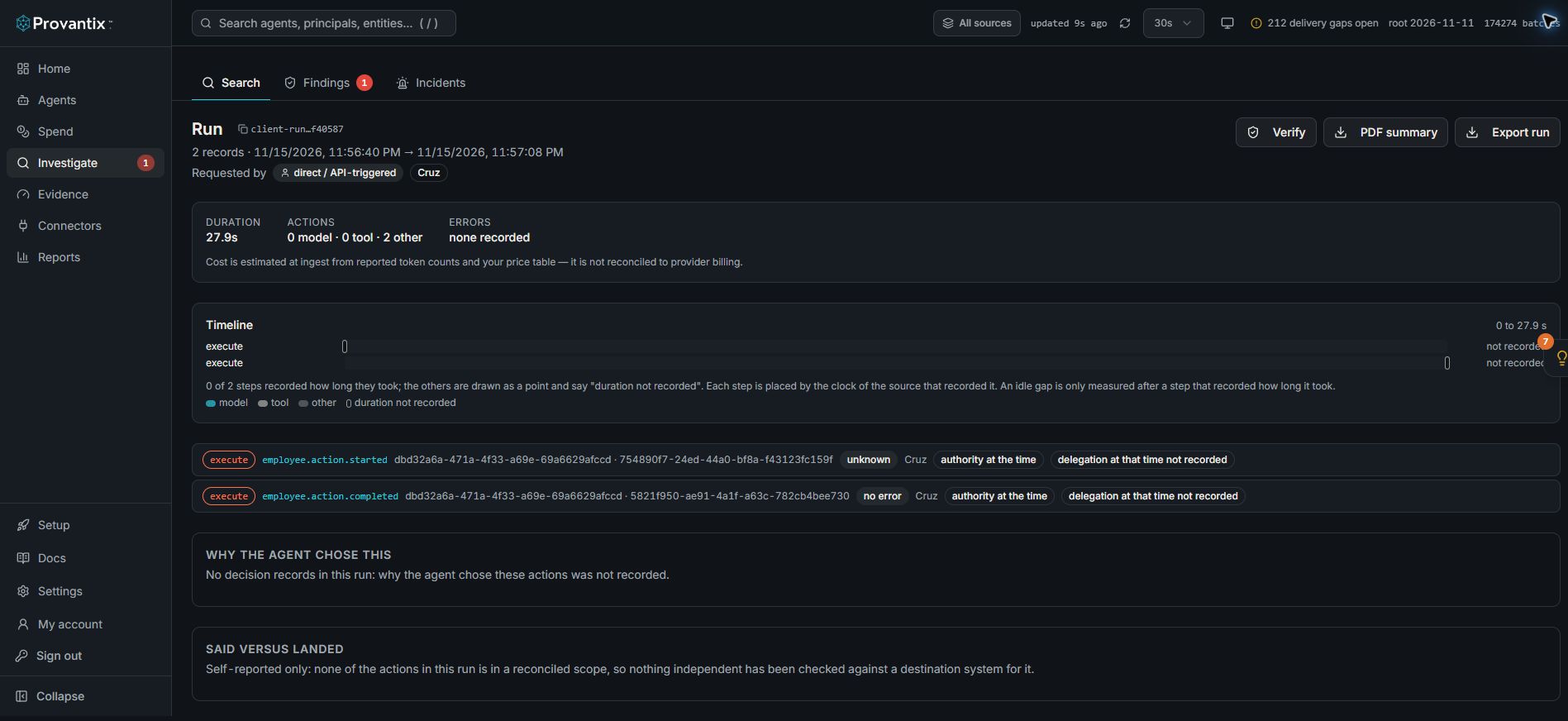
Product capture, 15–16 November 2026. Open the image for full size. Counts and dates are examples from the captured workspace.
This captured run has two execute records. Neither supplied a duration, so its timeline uses points marked not recorded. Why the agent chose this has no decision records, and Said versus landed is self-reported only. These absences are part of the evidence, not a successful verification.
Reading the chain
The chain is laid out top to bottom, in execution order:
- The request — who asked for what, and when.
- The approval — if a human approved the action, the approval decision with its actor and timestamp appears here. An approval is itself a record, so it verifies like any other.
- The acting agent — the agent that owned the run, linked to its agent page.
- Sub-agents — when the orchestrator delegated work, each sub-agent appears as its own branch. Delegation is reconstructed from span parentage, so orchestrator → worker → tool reads the way the code actually called it, not the way someone described it afterwards.
- Tool calls — each call with its target system, target entity, arguments' data classes and outcome. A failed tool call is drawn in red and stays in the chain; failures are part of the story.
Every node is clickable: it opens that record in the drawer with its hashes and attribution, so you can move from the shape of the run to the proof of any single step.
The timeline: where the time went
Above the chain, every step of the run sits on one shared time axis. A step starts where its observed time says, and where its source recorded how long it took (an OpenTelemetry span's end minus its start) it is drawn as a bar to scale. Parallel steps overlap. Models, tools and other steps have their own colours.
- A step whose source did not record a duration is a point, labelled "not recorded". It is never given a bar with a guessed length.
- An idle gap is shown only after a step that recorded a duration. After a step that did not, the time to the next step could be idle, or could be that step still running, and the timeline cannot tell which.
- Clocks are said, not hidden. Each step is placed by the clock of the source that recorded it. When a step starts before its own parent, two clocks disagree, and the note under the timeline says how many steps that affects. When several sources contributed, it says each has its own clock.
- The run length is the latest end. The Duration figure above it is still first start to last start, as before; the timeline's length also counts how long the last step took, when known.
Click a step's name to open its record. Long runs show the first 40 steps, with a link to show them all.
What the agent was allowed to do at that moment
Owners, reach and policies change. A reviewer asking what an agent was allowed to do when an action happened needs the answer for that moment, not for today. Every action in the chain, and every record in the drawer, shows Authority at the time of the action, labelled with the time it is as of:
- the owner, the lifecycle and the risk tier;
- the systems marked approval-required;
- the reach that was granted or declared;
- the identity (principal) mappings in force;
- the autonomy envelope the agent had been delegated, if one was recorded (see below);
- and what has changed since, if anything.
Changing an owner, a declared reach or an approval policy today adds a new entry to the agent's history. It never changes what an earlier action shows. The history is append-only, and an entry is added only when something actually changed.
The autonomy envelope. For an agent that works on its own, what it may do without a person is its own part of the history. An envelope records separate things, never one score: the mode (observe only, recommend, approval required, or independently authorized), the environments it may change, the actions and resources it may act on, any emergency exceptions, and the source that states it and how. The run view shows it beside the action ("delegated: approval required, not corroborated") with the details on hover, and an export carries it in authority.jsonl.
- A claim is not a corroboration. The source is one of: stated by the agent or its vendor, declared by the owner, or corroborated by an independent source that is named and points to what it holds. "Independently authorized" is accepted only from a corroborated source, so the words are never used for something nobody else vouched for.
- Later changes never rewrite it. A new grant, a revocation or an edit adds an entry. An earlier action still shows the envelope it ran under, and says the envelope has changed since.
- No record means unknown. An action from before any envelope was recorded, or after one was cleared, reads "delegation at that time not recorded". That is not "permitted" and not "forbidden".
- Provantix grants and revokes nothing. You record the delegation another system or person made, with
POST /api/agents/<id>/autonomy-envelope(an admin credential, areasonis kept in the audit log). It is a record of what was stated, and by whom, not an access control.
What is and is not reconstructible. The history starts when it was first kept for an agent. An action from before that shows authority at that time not recorded, and no value is shown in its place, because today's value is not the past. Credential age, observed reach and findings are not part of it. A change made directly in the database, outside the product, is not seen. If an agent is erased, its owner is removed from every entry in its history; the rest stays. The run export carries the same statement for each action in authority.jsonl, listed and hashed in the manifest. It is Provantix's own history of the agent. It is not part of the agent's signed record.
What happened to the action afterwards
An action can have a later fact attached to it: it was reversed, disputed, its ticket was reopened, a person overrode it, or it was retried. Each shows on the action in the chain, in time order, beside the action as it was recorded.
A later outcome is a separate dated entry that points at the action. The action's record, its hashes and its reconciliation result are not changed by it, and a signed export of the action is the same before and after. A reversal added to a confirmed refund leaves the refund destination-confirmed, with the reversal beside it.
What a link means, and what it does not. It records that something happened later. It does not say the agent was wrong: refunds are reversed, disputes are lost or won, and people override things for reasons unrelated to the agent's work. Provantix records outcomes. It does not judge them.
Retries are one action. When an agent tries the same action again with the same action id, the later attempts are linked to the first as retries, and the action is counted once. Each attempt keeps its own record and its own result.
Links are added with POST /v1/actions/{record id}/links (kind: reversal, retry, dispute, reopened or human_override; occurred_at; optionally origin, external_ref and later_record_id). Adding the same link twice does nothing. In Investigate, the field Later outcome finds the actions that were later reversed, disputed, overridden, reopened or retried.
The two buttons that matter
- Verify recomputes every record's hash in your browser and marks each node verified or failed. This is the same arithmetic the record drawer does for one record, applied to the whole run. If any node fails verification, the run was altered after signing — treat that as an integrity incident, not a display bug.
- Export run downloads the run bundle — a
manifest.jsonplus the run's records asrecords.jsonl— which verifies offline with no access to Provantix. This is the artifact you would hand to an auditor for one specific incident or flow. - PDF summary downloads a readable one-run summary: who requested it, the agents that acted, each step in order with its outcome and any approval (the approver as a handle), and the statement about destination records. It is not signed evidence: it says so, and carries a fingerprint, the SHA-256 of the run's trace id and its record hashes in order, which the run's export bundle also holds, so a summary and a bundle can be matched. Hand an auditor the bundle; use the PDF to read or share a run.
Said versus landed
For an action in a reconciled scope (for example refunds on a payment system, reconciled against that system's own records), the panel at the bottom of the run shows what the destination system recorded next to what the agent said. Each such action shows one of five states, and a reviewer can read from the panel what was checked, against what, and for which period:
| State | What it says |
|---|---|
| destination-confirmed | The destination's own record matches the claim (payment, amount, currency and outcome). The destination's status is shown beside it, because recorded is not the same as settled. |
| conflicting | The destination recorded something different (the amount, the outcome, or two records for one action), or the record the agent cited is proven not to exist. The panel names what differs. |
| pending | Too soon to expect the destination's record, or the collection does not yet reach the action. It is never treated as a failed action. |
| unverified | No unique matching record, or the destination was not collected for that period. This is not evidence that the action did not happen. |
| agent-reported | The agent made the claim and nothing has been collected from the destination yet. |
For each action the panel also says how it matched (by the refund id the agent cited, by the action id in the destination's record, or, weaker, by the same payment, amount and time), the collection window it relied on, and what would change the result. A result is never overwritten: when pending becomes confirmed, or a confirmed refund later fails, both results stay in the history.
Actions in the run that are not in a reconciled scope are listed as such. For them nothing independent has been checked, and the panel says so instead of leaving it to be assumed. If none of the run's actions is in a scope, the panel reads self-reported only. There is no single score for a run.
What to conclude here
Use the run view when a single record is not enough context: an incident review, a customer dispute about what the agent actually did, or a demo of accountability to your own compliance team. The conclusion you can defend afterwards: "this is the complete chain for run X; every step verifies; step 4 was approved by person Y; the destination system confirms steps 5–7 landed as reported" — or the specific sentence that replaces any clause that evidence cannot support.