Cost: what is being spent
The Cost page is one place for what your agents are costing. It is a view over figures the product already has: it calculates nothing of its own, and the breakdown is the Model usage and cost report for the period you choose.
Every figure is an estimate. Cost is priced at ingest from the token counts the emitters report and your price table. It is not reconciled to your provider's invoice, so it is good for splitting cost between teams, watching budgets and spotting a spike, and is not a billing record. Model calls with no price are counted and never estimated, so a total with unpriced calls is at least what is shown, and a missing figure reads "not recorded", never zero.
In the product
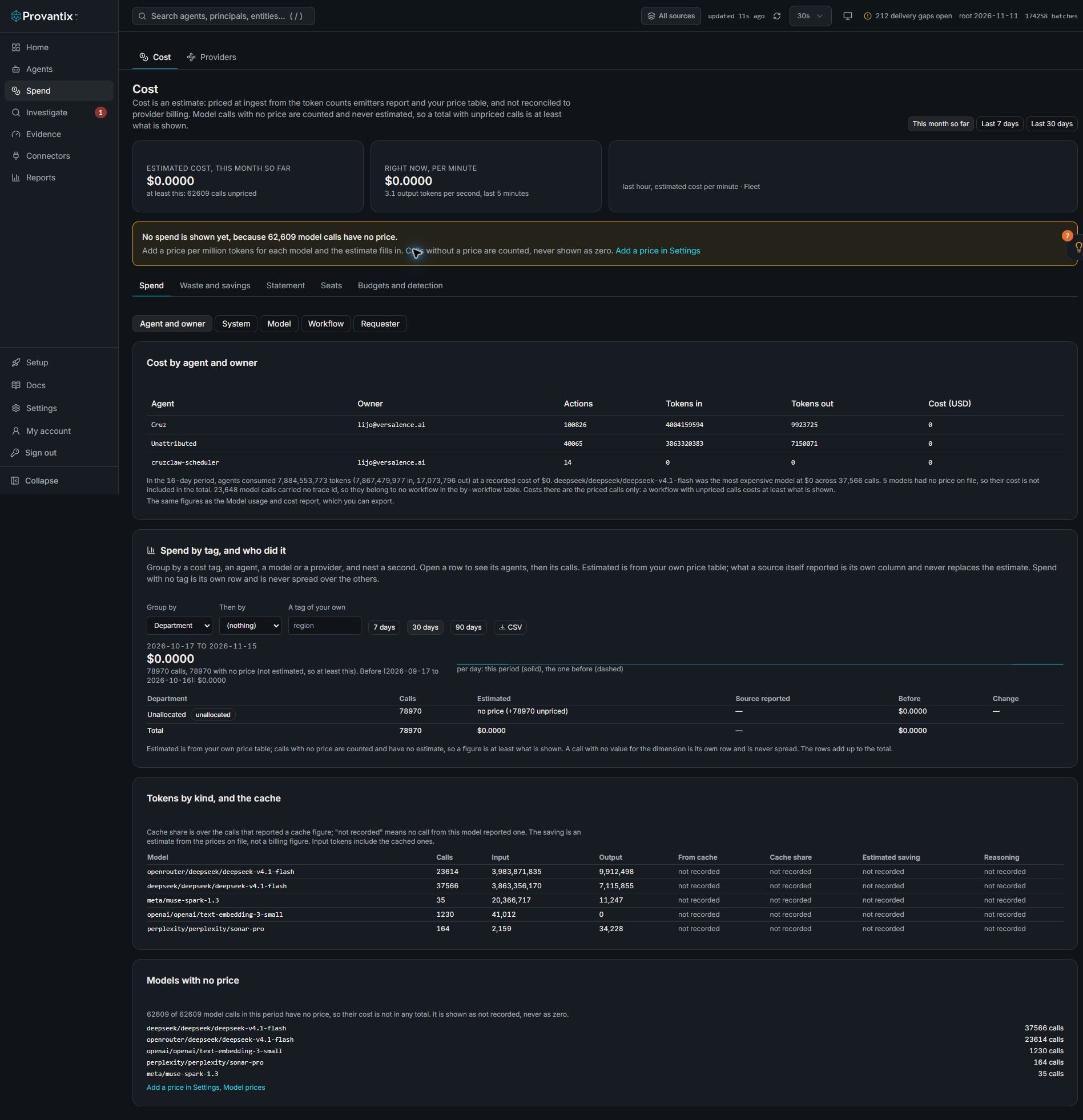
Product capture, 15–16 November 2026. Open the image for full size. Counts and dates are examples from the captured workspace.
Open Spend, then Cost. The warning in this example says model calls have no price: the zero estimate is not zero spend. The Spend, Waste and savings, Statement, Seats, and Budgets and detection tabs answer different questions.
What is on the page
- The summary. Estimated cost for the period (this month so far, the last 7 days, or the last 30 days), the cost per minute and output tokens per second over the last 5 minutes, and the last hour as a bar per minute. When any calls are unpriced it says how many, beside the total.
- The breakdown. Switch between agent and owner, system, model, workflow (one trace) and requester (a keyed handle, never a name). A workflow's cost is the priced calls in it, and calls with no trace id belong to no workflow; the line under the table says how many. The same tables, with CSV export, are in the report.
- Budgets and the roll-up. The organization, then each team, then each agent, with the spend so far this month and today, and the cap set on it where there is one. Spend is shown where no cap is set. A team's spend is the sum of its agents, so the levels add up; the organization is every recorded cost, including records no agent owns, so it can be more than the teams add up to. Agents with no team are grouped as "No team", and owners are listed apart because an owner is a person across teams. A cap is monthly, daily, or both, and a bar fills as spend approaches it. The open spend findings (over budget, unusual spend) are listed beneath.
- Models with no price. The models whose calls had no price on file, with their call counts. This is the usual reason cost reads as not recorded: a new or renamed model with no price row. Add one in Settings, Cost tab, Model prices, and the cost of past calls is recalculated.
Where else cost shows
The Home Cost tab and the Fleet burn rate (Agents, Live state) link here. The page has five tabs: Spend (the summary, the breakdown by agent, system, model, workflow or requester, spend by tag, tokens by kind and the models with no price), Waste and savings, Statement, Seats and Budgets and detection. When calls have no price, a banner above the tabs says so and links to where a price is added. The agent page shows an agent's own cost. Prices are edited in Settings, Cost tab, Model prices. Budgets and teams are set on this page, in the editor under the roll-up (an admin can set them).
What this does not do
- It does not show provider invoices, discounts or committed-use pricing.
- It does not cap spending or stop an agent. A budget is a statement the product compares recorded spend with, to watch the cost of your agents' telemetry. Nothing is blocked, and it has nothing to do with Provantix's own subscription.
- It does not know the cost of a call that reported no tokens.
Setting budgets and teams
- A budget has a level (organization, team, agent or owner) and a monthly cap, a daily cap, or both. Setting one for the same level again replaces it, and Remove deletes it. Spend above a monthly cap, or today's spend above a daily cap, raises a Spend over budget finding that closes by itself when spend is back under the cap or the cap is raised.
- A team is a plain label on an agent, set in the same editor, for rolling cost up. It is not access, and it is not part of the agent's authority history, so changing it never changes what an earlier action shows. Moving an agent moves its spend, past and future, in the roll-up.
- Budgets are month to date and today in UTC, whatever period is chosen for the breakdown.