People and departments
Spend by agent does not tell finance who it was for. The people directory says which department and cost center each person belongs to, from when, so a call that acted for a person can be placed in the department that person was in on that day.
Provantix does not know who anyone is until you tell it. It also shows only what sources report: it does not create usage that no source or provider reported.
In the product
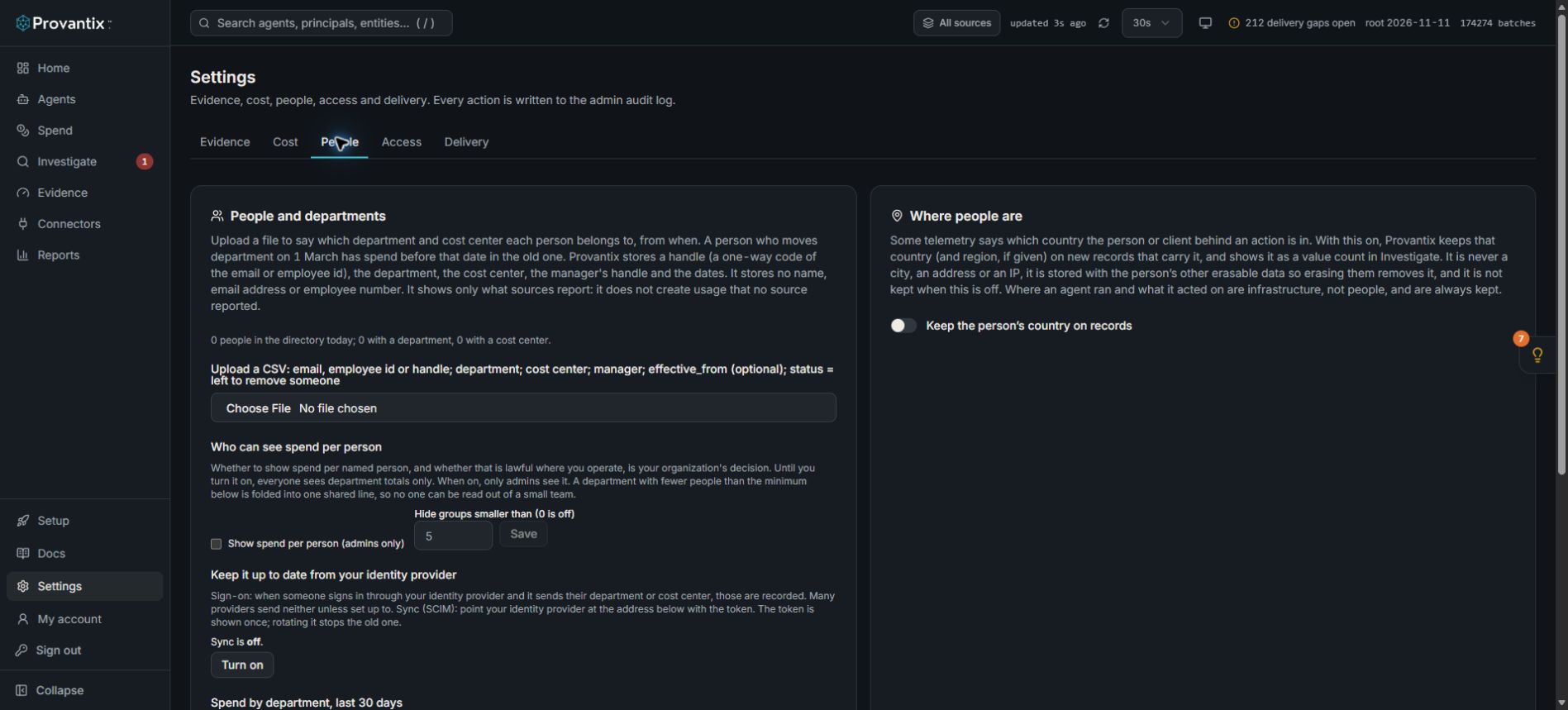
Product capture, 15–16 November 2026. Open the image for full size. Counts and dates are examples from the captured workspace.
Open Settings, then People. The directory counts, upload control and person-level visibility setting are separate. This example has no directory entries and person-level spend is off. Uploading a directory does not create usage records.
What is stored about a person, and what is not
| Stored | Not stored |
|---|---|
| A handle: a one-way code made from the email or employee id | Name |
| Department | Email address |
| Cost center | Employee number |
| The manager's handle | |
| The date the row applies from | |
| Where the row came from, who recorded it, and when |
The identifier in your file is turned into the handle and dropped. The handle is the same kind of code an approver on a record has. It is made after trimming spaces and lower-casing, so [email protected] and [email protected] are one person. Nobody reading the stored data can tell who a handle is without the original identifier.
Upload a file
Settings, People tab, People and departments. Choose a CSV with these columns (other common spellings, such as dept, cost centre or work_email, are read too):
| Column | Meaning |
|---|---|
email, employee_id or handle |
Who the row is about. One is needed. |
department |
Their department. |
cost_center |
Their cost center. |
manager |
The manager's email or employee id (stored as a handle). Optional. |
effective_from |
The date it applies from, YYYY-MM-DD. Today if left out. |
status |
left removes the person from that date. Optional. |
A row needs at least a department or a cost center, unless it removes someone.
Nothing changes until you apply. The preview says how many rows are new, changed, removed, already as stated, and rejected, with the reason for each rejected row (no identifier, no department or cost center, a date that is not a date, the same person twice on the same date). Applying writes only what changed, and records who uploaded, when, and how many rows changed. Uploading the same file again changes nothing. People missing from a file are not removed: say so with status.
A file can have up to 50,000 rows.
Keep it up to date from your identity provider
Two more ways fill the same directory. Neither invents anything: no claim, no row.
Sign-on claims. When someone signs in through your single sign-on and the identity provider sends their department or cost center, they are recorded from that day. The names read are department, cost_center (or costCenter) and manager. Many providers send none of them unless you set them up to: in Microsoft Entra, add them as optional claims on the app. A sign-in that changes nothing writes nothing.
Directory sync (SCIM 2.0). Settings, People tab, People and departments, Sync, Turn on. Provantix shows an address and a token, once. Give both to your identity provider as a SCIM provisioning connection (in Entra, Enterprise applications, Provisioning, Tenant URL and Secret Token). It pushes users with the enterprise extension's department and costCenter; active: false removes the person from that day. New token stops the old one; Turn off stops all sync. Turning on, rotating and turning off are recorded.
- The identity provider's user id and
userNameare both the handle, because no name or address is kept. A SCIM lookup byuserNamestill finds a person: Provantix turns the name it is asked about into the handle. - The manager is not read from sync: identity providers send the manager's own object id, which cannot be matched to a handle without storing identifiers. Use the
managercolumn of an upload, or a sign-onmanagerclaim. - Syncing a user that carries neither a department nor a cost center places nobody and is not an error.
- Each call that changes something is one entry in the list of recent uploads and syncs, with how many rows changed.
Moves and leavers
Rows are never edited or deleted. A move to Finance on 1 March is a new row from 1 March, so spend before that date stays in Sales. Someone who leaves gets a row that removes them from their last day, and their earlier history stays.
Who a call is placed under
A call names the person it acted for, in the user.id attribute of the telemetry. Provantix turns that into the same handle and finds the row in force on the call's date. The department and cost center then reach the cost tags as the person source: below what the call itself says and what you set on its agent, above a rule.
- A person not in the directory is unmapped. Their spend is shown as unmapped, counted, and listed for an admin. It is never dropped.
- A call that names no person (a scheduled agent, a shared key) is its own line. Those are not people. Tag them on the agent or with a rule.
- Calls stored before the directory existed are not placed by themselves. Run a re-tag from a date in Settings, Cost tab, Cost tags.
- Handles made by the SDK collector use your own key and will not match an email. Put the handle in a
handlecolumn to match them.
Who can see spend per person
This is your organization's decision, under its own policy and local law. Provantix supports every level.
- Default: department totals only. Everyone sees departments, the unmapped line, and the no-person line.
- Person level on: an admin also sees spend per handle. Members still see department totals only.
- Minimum group size: a department with fewer people than the minimum (5 by default, 0 turns it off) is folded into one shared line so nobody can be read out of a small team. If only one group is small, it is folded together with the next smallest, so the shared line is never a single team.
Changing either setting is recorded, with what it was and what it became.
Handles are shown, not names, because no name is stored. Matching a handle to a person is done on your side, from your own file.
Where the directory disagrees with itself
When more than one way fills the directory (an upload, sign-on claims, a sync), the rule is: the most recent row in force wins, whichever way it arrived. On the same date, the one recorded later wins. The row that lost is kept. Settings lists the people the ways disagree about, with what each said and which was used.
Where the numbers appear
GET /api/people/spend?from=2026-11-01&to=2026-11-30 returns departments, folded small groups, the unmapped line, the no-person line and a total that the lines add up to. Cost is the priced calls only. A call with no price is counted and not estimated, so a figure is at least what is shown.