Cost tags: department, cost center, product and more
Spend by agent is not how finance asks the question. They ask by department, cost center, product or project. Cost tags let every call carry those labels, so spend can be split by them, and the split can be traced back to the calls that make it.
Provantix does not invent a tag. It reads what a source says, applies what you have said, and records where each value came from.
In the product
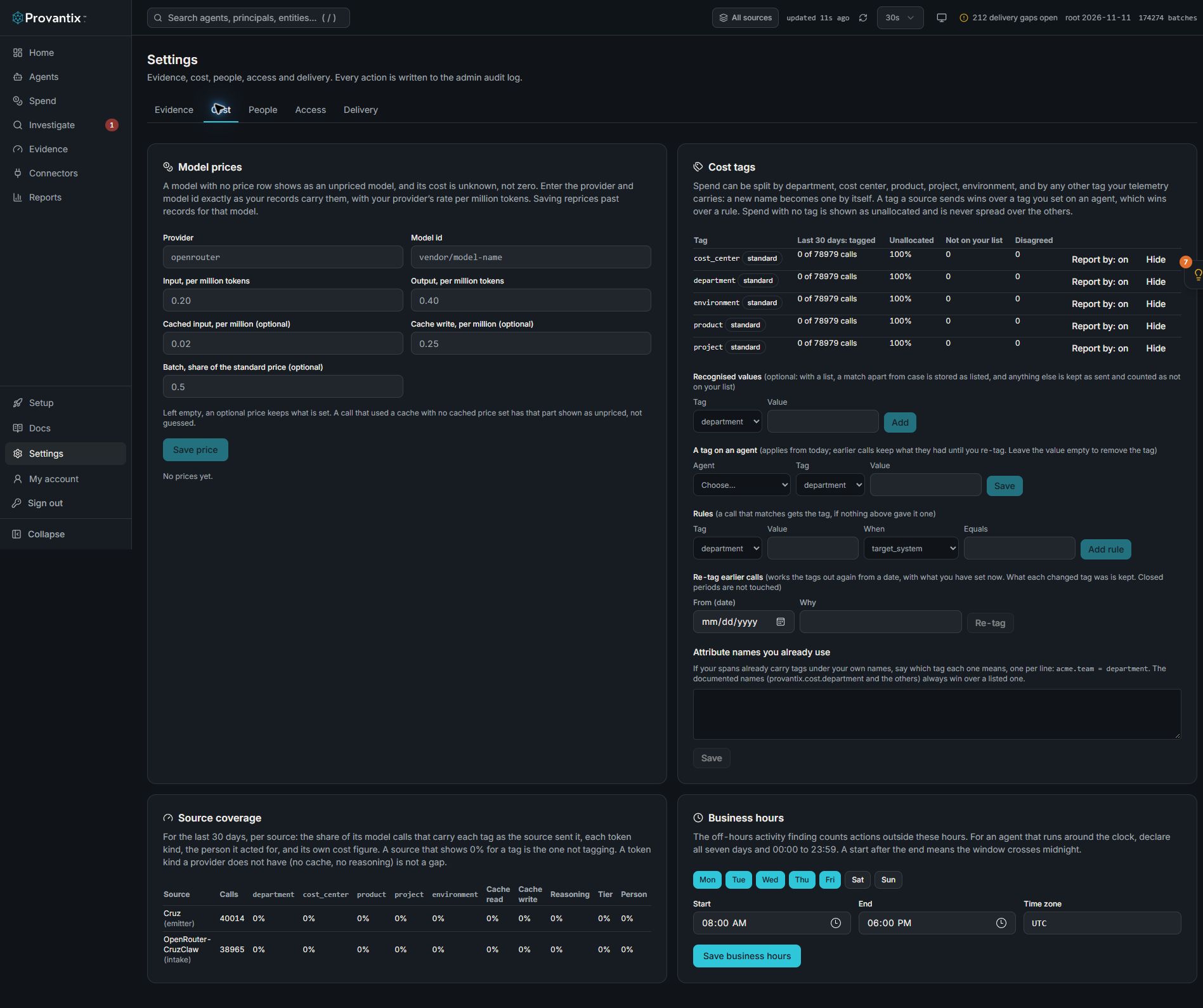
Product capture, 15–16 November 2026. Open the image for full size. Counts and dates are examples from the captured workspace.
Open Settings, then Cost. Cost tags shows tagged and unallocated calls, recognised values and rules. In this example every standard tag is unallocated. Source coverage helps locate missing fields at their source; re-tagging is a separate deliberate action.
The tags
Five are standard: department, cost_center, product, project and environment. They are a starting set, not a limit. Any other tag name that arrives in your telemetry becomes a tag of its own the first time it is seen, with no setup, and appears under Settings, Cost tab, Cost tags with where it came from. You can rename it for display, hide it, or mark it as one to report by.
How to tag, from each source
| Source | How |
|---|---|
| OpenTelemetry spans | Span or resource attributes: provantix.cost.department, .cost_center, .product, .project, .environment. Any other name: provantix.tag.<name>, for example provantix.tag.region. The OpenTelemetry deployment.environment.name is read as environment. |
| The SDK | buildAAR({ tags: { department: 'sales', region: 'emea' } }), or the same span attributes through the OpenTelemetry exporter. |
| The ingest API | Put tags inside the record's ext. |
A name is cleaned to lower case with underscores. A value is a short piece of text, up to 100 characters. An object or a list is not a tag.
Which value wins
When more than one source has a value for the same tag, the highest wins:
- The call itself: the source sent it.
- The agent: you set it on the agent (Settings, Cost tab, Cost tags).
- The person the agent acted for: their department and cost center from the people directory, as they were on the call's date.
- A rule you wrote, such as "when the target system is
salesforce, product is CRM".
Each call keeps the value, which of these it came from, and any lower value it overruled, so a disagreement is counted and can be listed. A call with no value from any of them is unallocated for that tag. Unallocated spend is a line of its own and is never spread over the others.
Your list of recognised values
For a tag you can give a list (for example, the departments you have). With a list, a value that matches one apart from case and spacing is stored as you spelled it, so sales and Sales are not two departments. A value on no list is kept exactly as sent and counted as not on your list. It is never merged into another value. A tag with no list accepts anything.
What a change does, and what it does not
- A tag you set on an agent, or a rule, applies from its date. Calls from before keep what they had.
- To correct earlier calls, set the tag with an earlier start date and re-tag from that date. What each changed tag was is kept.
- Periods that have been closed are not re-tagged.
- The record itself is never changed. What the source stated stays in it, as evidence. What Provantix made of it is kept apart, because it is your own labelling and has to be correctable.
Limits
To stop a faulty source from creating thousands of tags, one call carries at most 20 tags, and an organization has at most 50 tag names. Anything past a limit is counted and shown, never dropped silently. Settings, Cost tab, Cost tags says how many were held back.
What the numbers mean
Settings, Cost tab, Cost tags shows, for each tag over the last 30 days: how many model calls carry it, how much is unallocated (as a share, and in cost), how many values are not on your list, and how many calls had sources that disagreed. Cost is an estimate from the prices you entered. A call with no price is counted and its cost is not estimated, so any figure is at least what is shown.
The same split is available from GET /v1/tags/breakdown?dimension=department&from=2026-11-01&to=2026-11-30: a row per value, an unallocated row, and a total that the rows add up to.