Sources, filters and comparing
A source is one place data comes from: an SDK emitter, a connector collector or a hosted intake source (an OpenRouter or OTLP feed). When you have more than one, the risk is that their data blurs together. This page is how Provantix keeps it apart, and how to look at it.
The rule behind everything here: sources are never merged. A page showing all sources adds their records into one total, as it always has; nothing is combined across sources in the data itself. Every record belongs to exactly one source for life, stamped when it arrives and sealed with its batch. Each source keeps its own batch chain, sequence, gaps and day roots. Nothing below combines, moves or rewrites a source's data.
In the product
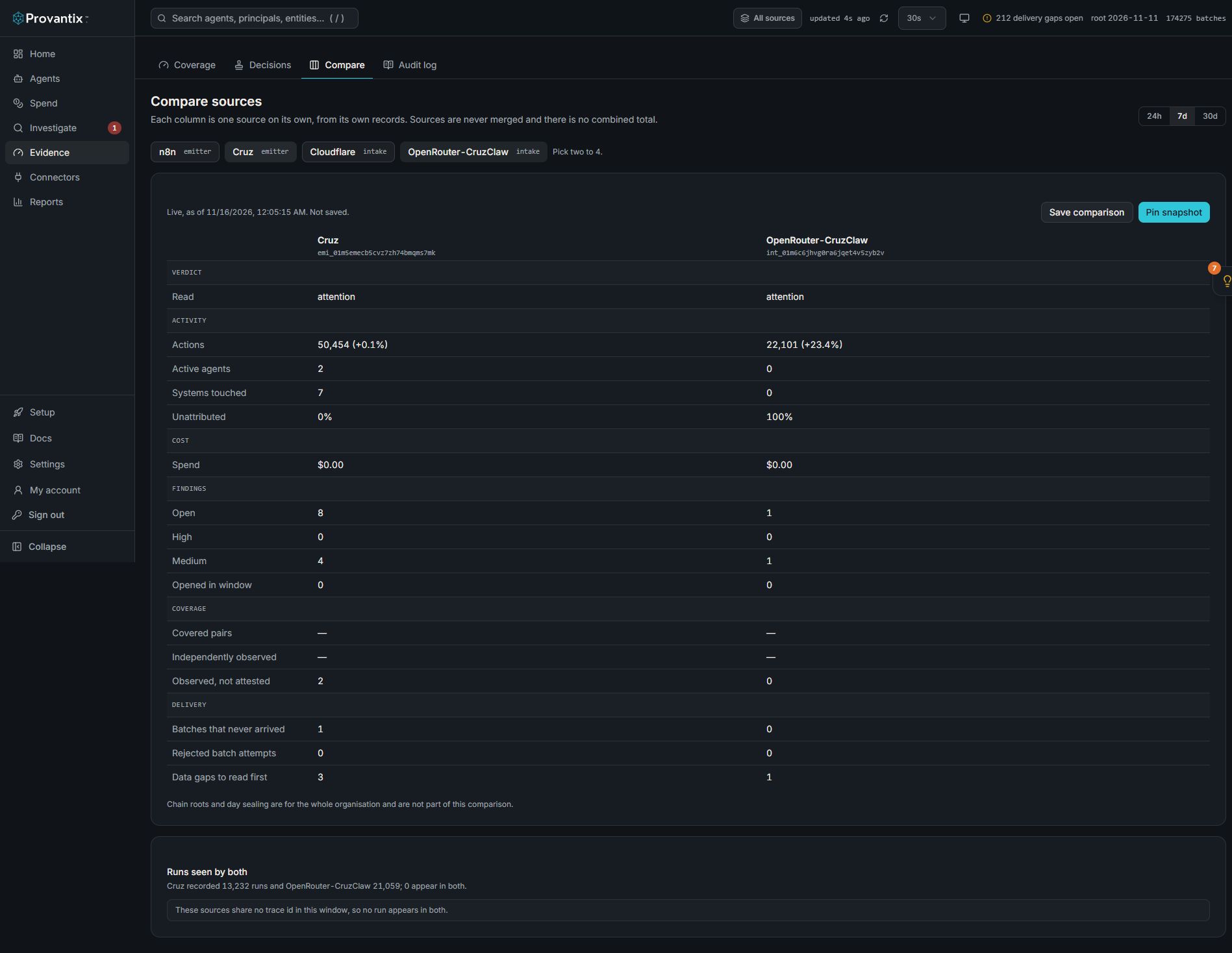
Product capture, 15–16 November 2026. Open the image for full size. Counts and dates are examples from the captured workspace.
Select two to four sources in Evidence, Compare. Each column uses its own records and the page provides no combined total. This example has no shared trace id, so Runs seen by both cannot join the two sources; it does not prove they observed unrelated work.
Name your sources
An emitter has an id like emi_01m5…. When you register one, the name you type is stored and shown everywhere in place of the id, with the id small underneath: on Setup, Connectors, Findings, and in the Home feed. Use the service it belongs to (prod, cruz, n8n).
To name or rename one later, open Setup, find it under Registered emitters, and choose Rename. A rename changes the label only; the id, key and history are unchanged.
The Source filter
Once you have two or more active sources, a Source control appears in the header, next to the refresh control.
- All sources is the default, and shows the organization as a whole, as Home and the other pages always have. Choose one or more sources to read them on their own; to see sources next to each other without adding them up, use Compare below.
- Choose one or more sources to narrow what you read. Home, Investigate, Findings, Coverage, Agents and Reports show only those sources' records, findings and agents.
- Investigate gains a Source column, so every row says where it came from.
- Your choice is remembered in your browser, so a refresh keeps it. It is a view setting: it never changes data and never affects exports, setup or anything that writes.
Two things do not narrow, and the control says so: chain roots and day sealing are per day for the whole organization, and the daily history on Home (posture calendar, coverage over time) is kept for the whole organization.
Retiring and revoked sources are not offered. If one is already selected it stays in the list so you can untick it.
Compare
Open Evidence, then the Compare tab, to read sources next to each other.
- Pick two to four sources and a window (24h, 7d or 30d). The choice is in the page's address, so you can share a link.
- Each column is one source on its own, computed from that source's records alone: verdict, actions and change, active agents, systems touched, unattributed share, spend (with
cost:read), findings, coverage, batches that never arrived, and rejected attempts. - There is no combined total, on purpose. Adding two sources together would hide exactly the differences you are looking for.
Compare is the quickest way to see that a new source's attribution is far worse than an established one's, or that one source is dropping batches and another is not. See A new source's records have no agent.
Runs seen by both
With exactly two sources selected, Compare lists runs seen by both: traces whose id appears in both sources, with how many records each recorded, so you can see where one source saw more of a run than the other. A difference is a prompt to look, for example one source missing calls the other recorded. It only works where both sources carry a trace id; where they do not, the page says so instead of guessing a match.
Save a comparison, pin a snapshot
- Save comparison keeps the choice of sources and window under a name. Opening it re-runs it on live data.
- Pin snapshot freezes what the comparison reads now, with an optional note, for later review. A snapshot holds aggregate numbers only: no record content and no record ids, so it never reaches back into evidence and erasure on the source data cannot be undone by it.
- Opening a snapshot shows the pinned numbers unchanged, a banner that it is derived analysis, not evidence, how far each source had got when it was pinned (last batch and record count), and how many records have been ingested since into the days it covers. Late deliveries mean a re-run now can read differently; Re-run now opens the live comparison.
Snapshots are for history: what did we see in October, and what was each source's state then? They are not part of any export.
From an assistant
The MCP tools accept a source argument to read one source, list_sources to see them, and compare_sources to set them side by side, with the same no-merge rule. See Connect your AI assistant.